Screen 02 of 2 · Audits
Audit detail
One audit engagement: status and verdict, the period, the auditors, the evidence package, disclosures, evidence bundles, history and follow-ups.
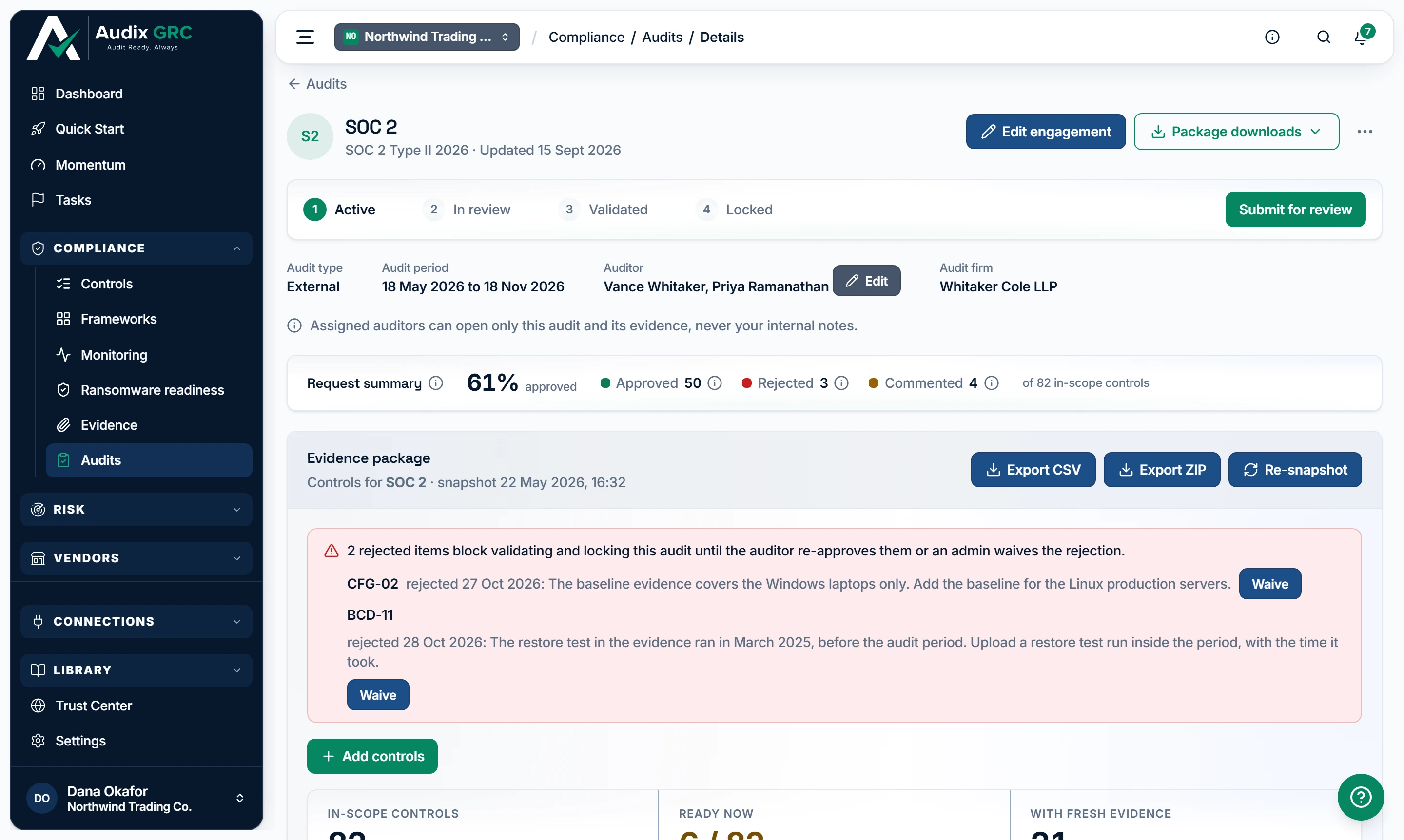
- Where the audit stands. Four steps, Active to Locked, with the next move beside them for an admin. Submitting records who submitted it, and Validate is then greyed out for that person, with the reason.
- Change the engagement. Name, framework, type, audit firm and period, while the audit is open. The form opens under the details.
- Hand the package over. A ZIP manifest of the in-scope controls and the same list as a CSV, both of which an outside auditor can take for themselves.
- Who audits it. The auditors on this audit's roster. Being on it grants no login and sends no invitation; signing in takes an account in your organisation that holds the Auditor role.
- How far the review has got. The share of in-scope controls approved, and how many are rejected or carry a comment. Each control counts once.
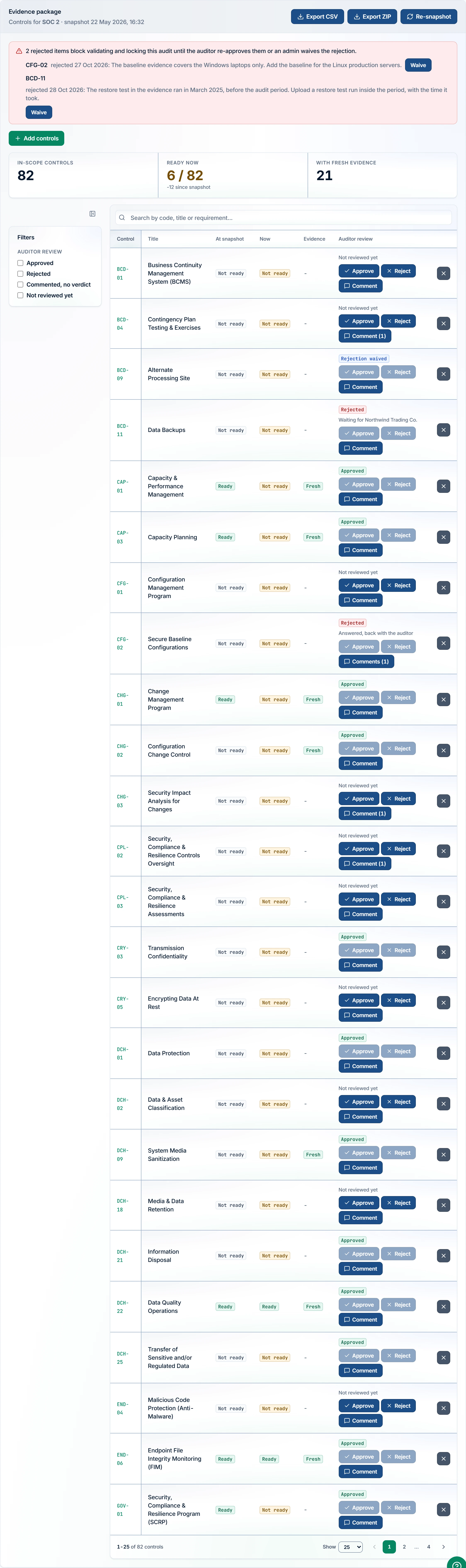
- Drift, without anyone tracking it. Readiness was written down on the snapshot date; this says how far it has moved since.
- Reviewed row by row. The auditor, or an admin, approves or rejects each control here, and both sides comment on it. A rejection blocks validating and locking the audit until it is re-approved or an admin waives it.
- Frozen beside live. Every control carries how ready it was when the package was assembled and how ready it is right now, side by side.
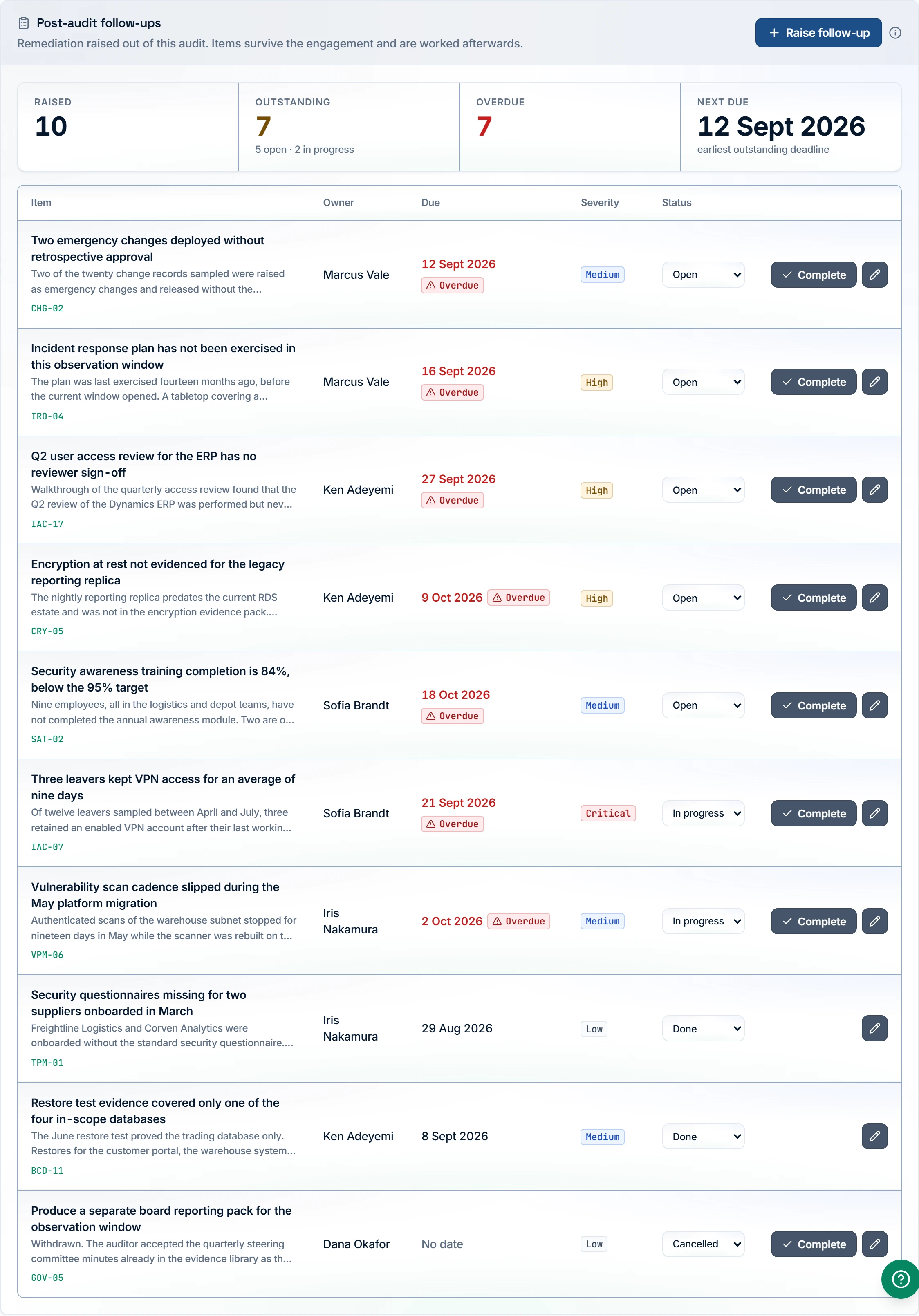
- Record what the auditor asked for. An admin adds the item with an owner, a due date, a severity and, if it belongs to one, a control from this audit's package.
- What is late. Open or in progress with a due date in the past. An item that is done or cancelled is never overdue.
- Members can move one along. A member can edit a follow-up and comment on a control in the package. The engagement, the package and the roster are admin only.
What completing an audit freezes
Wider than this screen: swipe sideways across the flow to follow it.
The engagement header with status and verdict, the calendar, assigned auditors and request summary cards, then the evidence package with each control's auditor review, the Evidence card, Disclosures, Evidence bundles, the history and the follow-ups.
Audix GRC Audit view: auditors review evidence in the portal
11 questions
Questions about this screen
How do I give an external auditor access to one audit?
On the audit, click Edit beside Auditor, add them with their email in Assigned auditors and click Save. If they already have an account in your organisation the pill reads Can sign in, and you can set their role to Auditor in Settings so they see only their assigned audits. Needs an account means Audix has to create their account first, because assigning someone never sends an invitation.
What can an auditor see in Audix?
Only the audits whose roster names them. In each one they read the engagement, the evidence package, the Evidence card, the disclosures, the history and the follow-ups, and download the evidence and the package files. In the package's control list they approve or reject each control and comment on it. They cannot change anything else, read your internal notes or open any other part of your organisation.
What is the difference between the manifest-only ZIP and the evidence bundle?
Manifest only (ZIP) holds the control list, readiness and disclosures, with no evidence files. An evidence bundle holds every evidence file behind the package and each check's result in the audit period, in a folder per in-scope control, plus the data sets an admin chooses, the disclosures and a manifest with a SHA-256 for every file. Evidence bundle (ZIP) in Package downloads builds one and downloads it when it is ready. An admin or the audit's auditor can build one.
How long can an evidence bundle be downloaded?
A ready bundle can be downloaded for 7 days, and each download link works for ten minutes. After that, an admin builds a new one with Build a bundle.
How do I check that a downloaded evidence bundle is complete and unchanged?
Each ready bundle shows its SHA-256 on the Evidence bundles card: copy it and compare it with the hash of the file you downloaded. Inside, the manifest lists a SHA-256 for every file, and summary.txt names any evidence file that could not be included.
What do the Disclosures on an audit show?
Every decision that changes what ready means for the controls in the package: waivers that overlap the audit period, disabled tests and their reasons, tests switched off and on during the period, test exclusions, controls scoped out, controls marked not applicable with the reason and who marked them, choices on connections and any personnel samples. Every export of the package lists the same disclosures, so your auditor sees what you see.
How does the auditor review controls in Audix?
In the audit's Evidence package, each control has an Auditor review column. The auditor, or one of your admins, clicks Approve, or Reject with a reason, and both the auditor and your own people can Comment. An admin never changes a verdict the auditor recorded. A rejection blocks validating and locking the audit until the auditor re-approves it or an admin waives it with a reason. There is no sample to draw: the controls are reviewed straight from the package.
Who can validate an audit in Audix?
An admin other than the one who clicked Submit for review, and only while no rejected control or evidence item is outstanding. Validation by the submitter is refused for separation of duty, and both people have to be admins.
Can I change an audit after it is completed?
A completed audit is locked: its engagement details, roster, package and controls cannot change, and nobody can approve, reject or comment on controls. An admin clicks Reopen to return it to Active. The verdict and the follow-ups can still be recorded and edited while it is completed.
How do I see who downloaded the audit package?
Open Package downloads and click View past downloads. It lists when, who, what and how many controls for every manifest ZIP, control list CSV and evidence bundle download, auditors included. Single evidence files downloaded from the Evidence card are not listed.
What does Re-snapshot do to an audit's evidence package?
It asks first, then rebuilds the package from the framework and freezes every control's readiness again. Controls you added by hand that the framework does not map are dropped, custom controls included, so add them again afterwards. The auditor's verdicts and comments stay on record.