Vendor questionnaires
Send a supplier a private link, get their answers back, and turn them into a risk band.
A questionnaire is a set of questions you send to one of your suppliers. An admin picks a template and a vendor, and the platform emails that vendor's contact a private link. The vendor opens it without signing in, answers, uploads documents, and submits.
On submit the platform scores the answers, puts them in a risk band, and writes that band onto the vendor. A reviewer then reads which answers were risky and which documents never arrived, can ask the vendor about one specific answer through a second private link, and records a sign-off: approved, conditionally approved, or not approved.
Two questionnaires ship with the product, so you can send one on your first day without writing any questions.
Who uses this
Admin
Can create and edit templates, send to one vendor or many, answer a questionnaire internally, sign off, run follow-up threads, resend an invite, download uploaded files, file one into the vendor record, and export the CSV
Cannot delete a built-in template, or change a review decision once it is recorded
Member
Can read the register, the detail page, every template including its weights and risky answers, the follow-up threads, and export the CSV
Cannot send, answer, sign off, comment, or download a file the vendor uploaded
Approver
Can everything a member can, plus record the internal sign-off and open, reply to and resolve follow-up threads
Cannot send a questionnaire, answer one, or edit a template. Raise follow-up and File it are shown to approvers but refused by the server
Auditor
Can read the same screens as a member
Cannot change anything at all. Every write is refused
Outside party: the vendor's respondent
Can open the private link with no account, answer, upload documents, save progress, submit, and reply on a second link when a reviewer asks a follow-up question
Cannot sign in, see weights, option scores, the risk band or the review decision, change anything after submitting, or start a follow-up thread
The screens
Vendor questionnaires
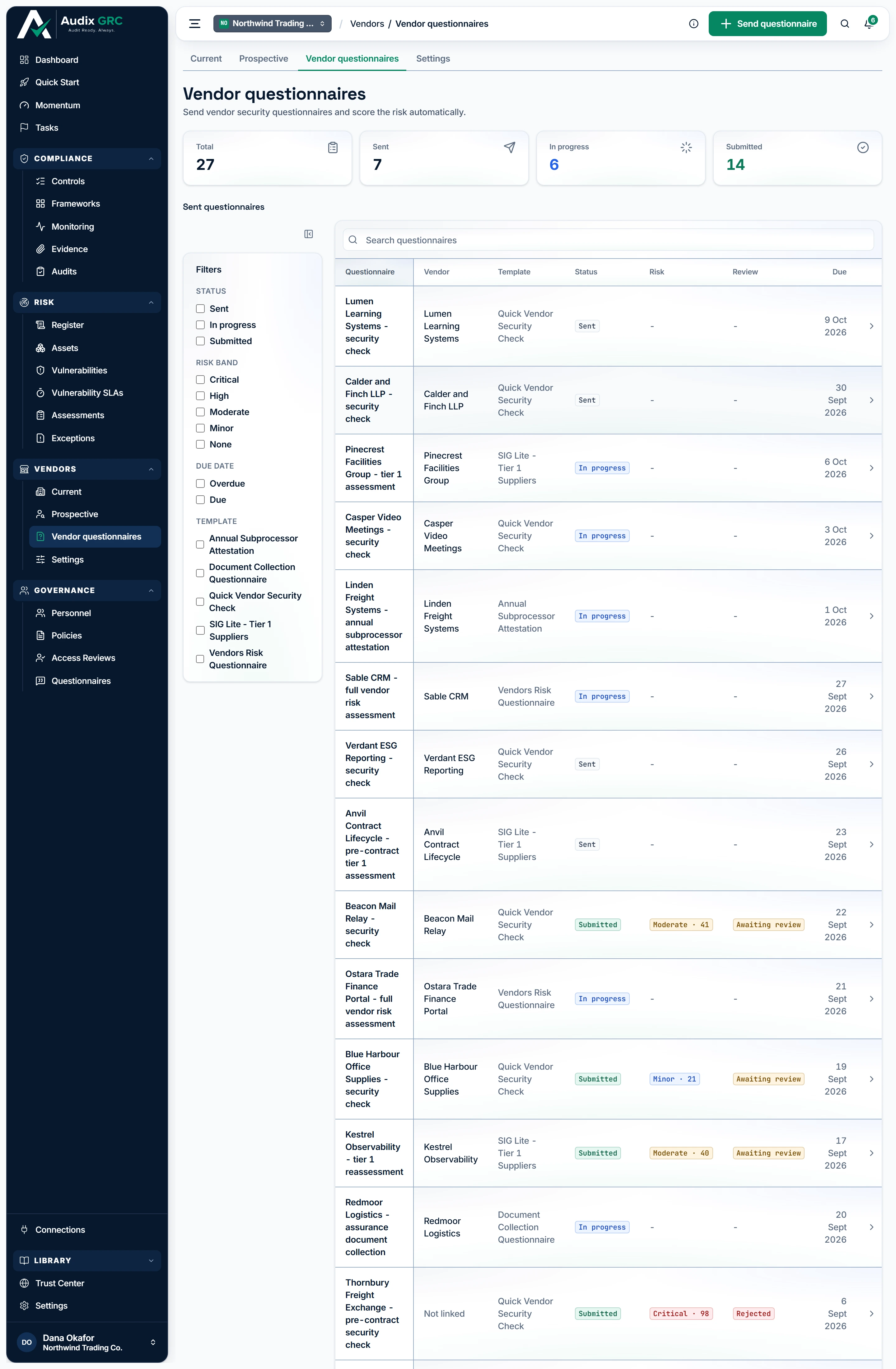
- Send one questionnaire. Pick a question set and a supplier, and Audix emails that supplier's contact a private link they can answer without an account.
- Everything you have sent. One row per send, carrying three readings that move independently: how far the vendor has got, the risk band their answers scored, and whether anyone inside your organisation has signed it off.
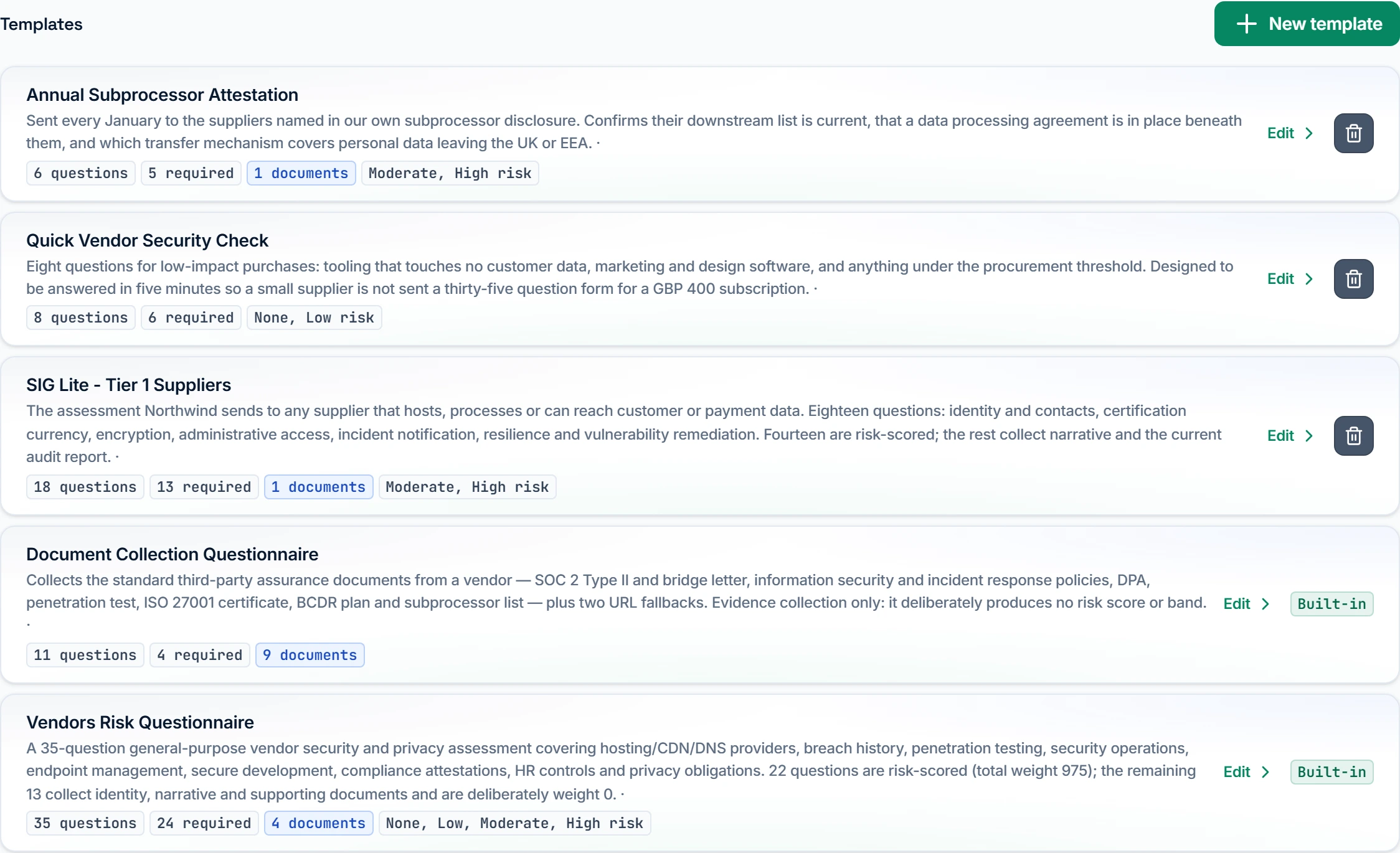
One questionnaire, and who is holding it
Tiles for Total, Sent, In progress and Submitted, the Sent questionnaires table, and the Templates list. Send questionnaire and Send to several vendors show for admins only.
Questionnaire detail
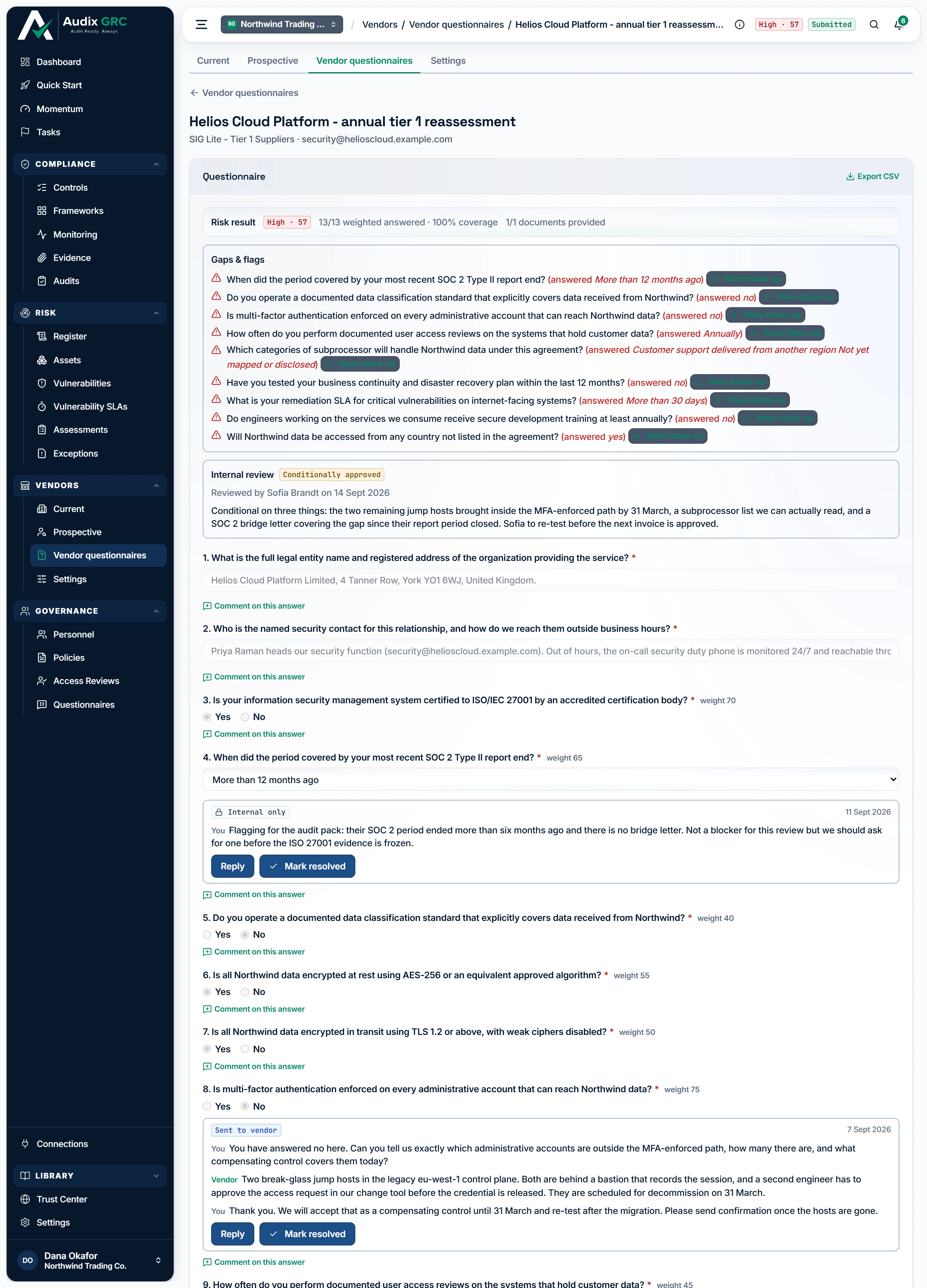
- One band, and what it rests on. The score comes only from the questions that carry weight, so the coverage figure beside it says how much of the form the band is actually based on.
- Turn a risky answer into work. This panel is rebuilt from the answers every time the page opens and remembers nothing, so raising a follow-up is what makes somebody responsible for closing it.
- Your own verdict, recorded once. Kept apart from anything the vendor wrote, and refused a second time: approved, conditionally approved or not approved.
- A question the vendor can see. Every thread says which it is, because a note meant for colleagues that lands in a supplier's inbox cannot be recalled.
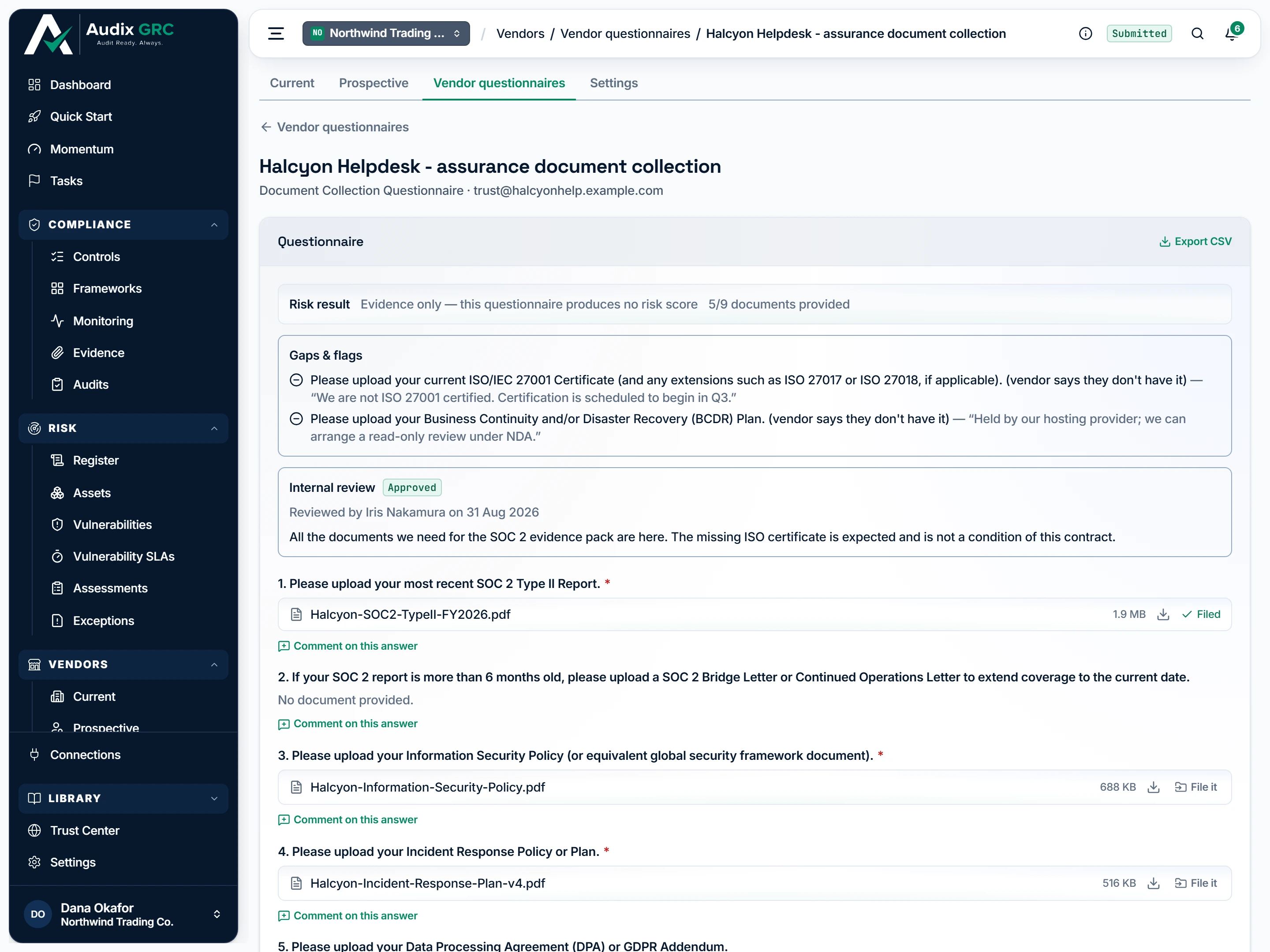
- No score, and that is correct. Nothing in this questionnaire carries weight, so there is no band to give; the strip counts documents instead, which is the only signal this kind of questionnaire carries.
- Handed over as a download. Files arrive from outside your organisation and are never opened in the browser, whatever they claim to be.
- Keep it with the vendor. Copies the document into that vendor's own records, so deleting this questionnaire later cannot pull the file back out again.
What a submission changes outside itself
Status and risk pills, Export CSV, the risk result, Gaps & flags, the internal review panel, and every question with the answer it got.
New template
An empty name and description plus one starter question.
Template
The template rendered exactly as the vendor will receive it, with a pencil on each question for an admin and a padlock for everyone else.
Vendor page, Security assessments
The questionnaires sent to that one vendor with their status, band and review pills.
Answer the questionnaire
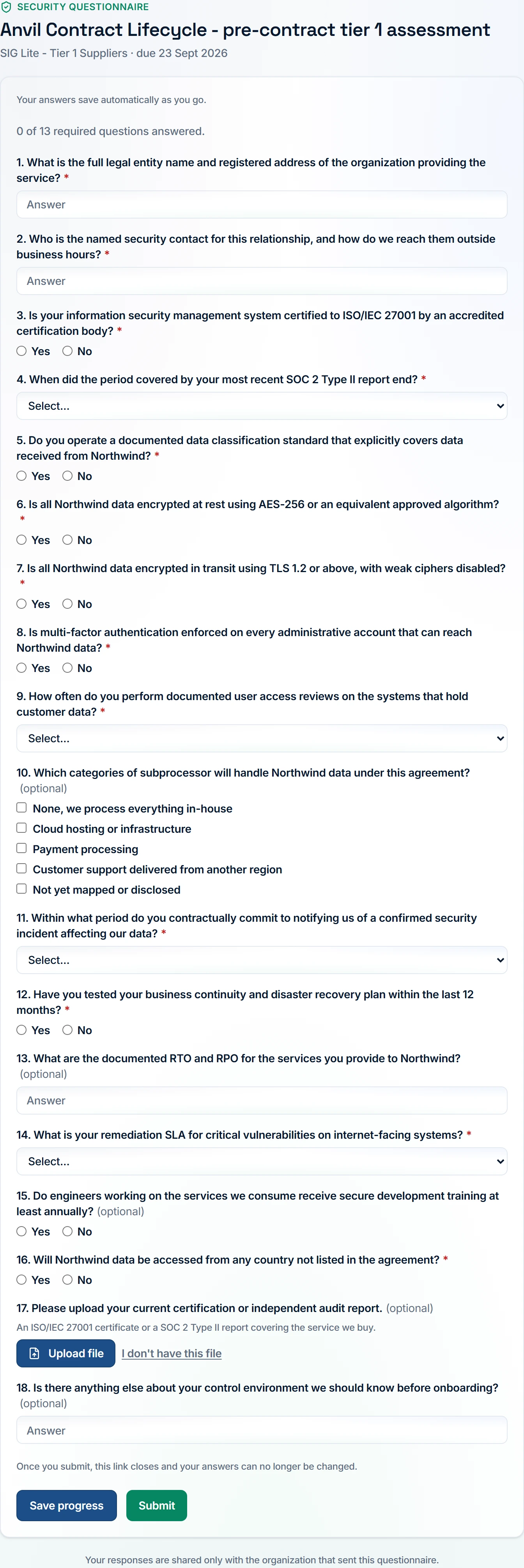
- What is still outstanding. Counts only the questions that must be answered, so the vendor knows what stands between them and being able to submit.
- Saying so is an answer. A document a supplier genuinely does not hold is recorded with their reason, which reaches the reviewer as a decision to make rather than as a chase.
- Submitting closes the link. Answers save on their own until this point; afterwards the link stops working and nothing can be changed, which is why the warning sits directly above it.
The private link, and the three ways it ends
The questions, the upload controls, and the save and submit buttons. After submission it shows that the link is no longer valid.
Follow-up questions
Only the questions a reviewer asked about, the respondent's own answer to each, and a reply box.
What you can do
Keep a library of reusable question setsLive
A template is a set of questions you send again and again. A sent questionnaire keeps its own copy of the questions, so editing a template never changes anything already sitting in a vendor's inbox.
As a member
- Open Vendor questionnaires and scroll to Templates.
- Each row shows the name, the description, how many questions it holds, how many are required, how many ask for a document, and its risk levels.
- Click a row to read it. The hint on the right says View, not Edit.
As an admin
- Click New template for an empty one, or click any row to edit it.
- A bin appears on templates your organisation created. Click it and confirm to delete.
- The two shipped templates carry a Built-in pill instead of a bin.
Rules that apply
- A template holds at most 200 questions, and each question at most 20 options.
- A built-in template cannot be deleted. Edit its questions, or ignore it when sending.
- The marking scheme, meaning weights, risky answers and option scores, is readable by every member and every auditor on the template page. The vendor never sees it.
Start from the two questionnaires that ship with the productLive
Every organisation starts with an empty template list, so two authored questionnaires are loaded for you. Both are ordinary templates once they arrive.
As a member
- Open Templates. Both carry a Built-in pill.
- Vendors Risk Questionnaire asks 35 questions, 24 of them required. 22 carry weight, so it produces a risk score. It covers twelve business areas from Engineering to Legal.
- Document Collection Questionnaire asks for 11 items, 9 of them file uploads. Four are required: SOC 2 Type II, the information security policy, the incident response plan, and the penetration test report.
As an admin
- Same as a member, plus you can edit either one.
- Before your first edit the page warns you what you give up. Click Duplicate instead if you want to keep receiving improvements to the shipped version.
Rules that apply
- The Document Collection Questionnaire has no weighted questions, so it produces no risk score. The detail page says as much where the band would be.
- Once you edit a built-in template, later improvements to the shipped version stop being applied to your copy. Your changes are kept.
- Question identities stay stable across upgrades, so answers already collected stay attached to the right question.
- The two templates arrive only when an operator runs the loading command. There is no button for it in the product.
Read a template as the vendor will get it, and edit one question at a timeLive
Most visits to a template are somebody asking what it actually asks. The page opens as a document, not a form, with every question drawn in the real control the vendor will see.
As a member
- Click a template row on Vendor questionnaires.
- Under Questions each one renders with its real control: radio buttons, a dropdown, checkboxes, an Upload file chip or a text box. The controls do not respond, because this is a preview.
- A padlock sits where an admin would see a pencil.
As an admin
- Click the pencil on one question. That question turns into an editor and the rest of the page stays a document.
- Change the text, the type, the weight, the risky answer, score on, whether it is required, whether the vendor may say they do not have the document, the guidance line, and the options with their risk scores.
- Click Save question. The row goes back to its read view and shows Saved. Cancel puts it back exactly as it was.
- Use Move up, Move down and Remove beside the save buttons, or Add question at the end.
- Use Edit on the details card for the name and description, and Duplicate to make a copy named after the original.
Rules that apply
- A banner above the questions says it plainly: questionnaires already sent keep the questions they were sent with, and your changes apply to the ones you send from now on.
- A question with no text is refused. So is a Choose one or Choose several question with no labelled option.
- Blank option rows are dropped when you save, and labels are trimmed.
- Changing a question's type keeps the fields that no longer apply. Only the weight is reset.
- One question is open at a time, and the browser warns you before you navigate away with an edit open.
Decide how a question is scoredLive
A question's type decides which control the vendor gets and whether the answer counts towards the risk score. The weight decides how much it counts.
As a member
- Not available. Only an admin can change this. You can read every setting on the template page.
As an admin
- Open the pencil and pick a Type: Yes / No, Choose one, Choose several, Free text or Upload a document.
- Set the weight from 0 to 100. Weight 0 takes the question out of scoring completely.
- For Yes / No, name the risky answer. The answer scores 100 when it matches and 0 when it does not.
- For Choose one, give each option its own risk score. The selected option's score is the answer's score.
- For Choose several, give each option a score and pick score on: the riskiest selection (dependencies) or the strongest selection (credentials).
Rules that apply
- Free text and Upload a document are never scored. They are collected for a reviewer to read, and the editor says so under the type picker.
- Score on the riskiest selection for a question like which cloud providers do you use. Score on the strongest selection for which certifications do you hold, where counting the worst would punish a vendor for holding more of them.
- The vendor never receives weights, risky answers or option scores.
- An answer to Choose several is stored one label per line rather than comma separated, because option labels routinely contain commas. An option label cannot contain a line break.
Send a questionnaire to one vendorLive
Copy a template onto a new questionnaire, create a private link, and email it to the person who will answer.
As a member
- Not available. The Send questionnaire button is not shown to you.
As an admin
- Click Send questionnaire at the top of Vendor questionnaires.
- Pick a Template, and a Vendor if this one belongs to a vendor.
- Type a Title. Add a Respondent email and a Due date if you have them.
- Click Send. The card confirms whether the respondent was emailed a link, or tells you the email could not be sent.
- The link is always shown with a Copy button, next to View questionnaire and Send another.
- The same card is on the vendor's own page under Security assessments, already pointed at that vendor.
Rules that apply
- The template's questions are copied onto the questionnaire when you send it. Later template edits never reach it.
- The link stops working 30 days after it is created.
- With no respondent email, nothing is sent. You are handed the link to pass on yourself.
- If mail fails the questionnaire is still created. Copy the link from the card and send it another way.
- A template or vendor that no longer exists is refused before anything is created.
Send the same questionnaire to many vendors at onceLive
Run an annual refresh across dozens of suppliers as one action, with one due date.
As a member
- Not available. The Send to several vendors button is not shown to you.
As an admin
- Click Send to several vendors on Vendor questionnaires.
- Choose a Template, and a Due date if the whole batch shares one.
- Tick vendors in the list. Each row shows that vendor's contact email, or a No email pill, before you send.
- Click the button, which counts what you ticked.
- Read the result. It names the vendors that failed and why, and names the ones created without an email so you can open each and copy its link.
- Click Done.
Rules that apply
- At most 200 vendors in one send.
- Sends run one after another. One failure does not stop the rest.
- A vendor with no contact address still gets a questionnaire. It is created without an email and waits for you to share its link.
- A bulk send does not ask for a title, and the questionnaires it creates are left with an empty one. That blank is what shows in the register and in the invite email's subject line.
Answer the questionnaire as the vendorLive
Let an outside party answer with no account, keep their progress between sittings, and close the link the moment they are finished.
As a member
- Nothing to do here. This is the page your vendor sees. Read what they sent on the questionnaire detail page instead.
Rules that apply
- A warning sits above the buttons before you commit: once you submit, the link closes and your answers can no longer be changed.
- Submit is refused while a required question is unanswered, and names up to three of them. A template with no required questions needs at least one answer.
- Every rejection reads the same way: the link is no longer valid. Expired, revoked, already submitted and mistyped are not told apart, on purpose.
- Deleting an upload is the only way to correct a wrong file, because the link closes at submit.
- Retracting I don't have this file is refused while a file is attached to that question. Remove the file instead.
Record answers a vendor sent you by emailPartial
A vendor often emails their answers to their account manager instead of using the link. An admin can type those answers into the questionnaire so the record sits in one place.
As a member
- Not available. The questions render with every control disabled and a line saying that only an administrator can answer this questionnaire. You can read it.
As an admin
- Open a questionnaire that has not been submitted.
- Read the two counters above the questions: how many weighted questions are answered, and how many documents have arrived.
- Fill in the radio buttons, dropdowns, checkboxes and text boxes.
- Click Save progress. The status moves to In progress.
- Click Submit & score. The page saves, submits, then shows the risk result, the gaps panel and the internal review panel.
Rules that apply
- Document questions cannot be answered here. There is no upload control on this page, so a questionnaire whose required questions are all documents cannot be submitted from inside the product. Send it to the vendor instead.
- The same completeness rule applies as on the vendor's own page. Every required question has to be answered.
- Free text questions have no AI drafting, on purpose. Model-written prose would be impossible to tell from the vendor's own words later.
- An internal submit scores and rolls up to the vendor exactly like a submit from the link.
Collect the actual documentsLive
Get the SOC 2 report, the penetration test and the policies themselves, rather than a sentence claiming they exist.
As a member
- Nothing to configure. These limits are fixed and apply to every questionnaire and every vendor.
Rules that apply
- 5 MB per file, 5 files per question, and 20 files or 25 MB per questionnaire. The browser checks the size before the upload starts.
- PDF, PNG, JPEG, GIF, WebP, plain text, Word, Excel and PowerPoint are accepted. Anything else is refused with a message naming what is allowed.
- CSV is refused deliberately. A cell that begins with an equals, plus, minus or at sign runs as a formula when a reviewer opens it.
- The contents of the file are checked against the type it claims to be. A renamed file is refused.
- Files are not scanned for viruses. Every one of them arrives from outside your organisation.
Turn the answers into a risk bandLive
Produce one score and one band from the answers, and refuse to produce a band when too little of the form came back.
As a member
- Open a submitted questionnaire.
- The Risk result strip shows the band and the score, how many weighted questions were answered with the coverage percentage, and how many documents arrived.
- A questionnaire with no weighted questions says it is evidence only and produces no risk score.
Rules that apply
- Free text questions, document questions and anything with weight 0 are left out of the score entirely.
- Unanswered scorable questions still count towards the total that coverage is measured against. Silence lowers coverage. It does not flatter the score.
- Below 50 percent coverage the score is shown, the band is withheld, and nothing is written to the vendor.
- When a band is produced and the questionnaire is tied to a vendor, that band becomes the vendor's residual risk, the last review date is set to today, and the next review deadline is recalculated from your review cadence.
- A low score reads green, because low risk is the good outcome.
See what is wrong with a submissionLive
After a vendor submits, say what is actually outstanding, in four kinds that mean four different things.
As a member
- Open a submitted questionnaire and read Gaps & flags above the questions.
- Risky answers come first, in red, each with the answer that triggered it.
- Then scorable questions left unanswered, then required documents that never arrived, then documents the vendor said they do not have, with their reason.
- When nothing is outstanding the panel says every weighted question was answered with no risk flags, and whether every requested document arrived.
As an admin
- Same as a member, plus Raise follow-up beside any risky answer.
- Click it to turn that answer into a tracked follow-up on the vendor, which records the questionnaire it came from.
Rules that apply
- A risky answer is one scoring 60 or more.
- Documents are counted separately from coverage. A document questionnaire has no weighted questions and would otherwise report full coverage for a vendor who uploaded nothing.
- The panel is rebuilt every time you open the page and remembers nothing. Raise follow-up is what turns a noticed risk into something tracked.
Record the internal sign-offLive
Write down a human judgement about a submitted questionnaire, kept separate from the vendor's own submission.
As a member
- Not available. The panel says the questionnaire is awaiting internal review and shows no form.
As an admin
- Open a submitted questionnaire and find Internal review under the gaps panel.
- Pick a Decision: Approved, Conditionally approved or Not approved. Nothing is preselected and the button stays disabled until you choose.
- Add a Note if the decision needs context.
- Click Submit review. The panel turns read-only and shows the decision, who made it, the date, and the note.
Rules that apply
- An approver can record this decision too. It is one of only two things an approver can write here.
- The decision is recorded once. A second attempt is refused, and the screen warns you before you commit.
- Only a submitted questionnaire can be reviewed.
- A review never reopens the submission. The status stays Submitted whatever you decide.
- A Not approved questionnaire stops counting as evidence for vendor approval.
Ask the vendor about one specific answerLive
Query one answer after submission and get a written reply, without letting the vendor change anything they already submitted.
As a member
- Existing threads are visible under the answer they belong to. The Comment on this answer button is not shown to you.
As an admin
- On a submitted questionnaire, click Comment on this answer under the question you want to query.
- Type your question.
- Click Ask the vendor to email them a link to that one question, or Internal note to keep it inside your organisation.
- Each thread is labelled Sent to vendor or Internal only, and Resolved once closed.
- Use Reply to add a message, and Mark resolved to close the thread.
- If the email failed, the page shows the follow-up link with a Copy button so you can send it yourself.
Rules that apply
- A thread can only be opened once the vendor has submitted. Before that there is nothing to query.
- A comment is internal unless you click Ask the vendor. That default is deliberate, because a note that lands in a vendor's inbox cannot be recalled.
- The follow-up email goes to the address the admin entered when sending, never to an address supplied by whoever holds a link.
- The follow-up link lives 14 days, and never more than 90 days from the day it was first created. A vendor's reply does not extend it.
- The vendor sees only the questions under discussion and their own answers to them. Not the rest of the submission, not the score, not the review decision, not any internal note, and never who asked.
- Resolving the last open thread revokes the follow-up link.
Send a fresh link when the first one goes astrayLive
Chase a vendor whose link went to spam, or went to somebody who has since left.
As a member
- Not available. Resend invite is not shown to you.
As an admin
- Open a questionnaire that has not been submitted and click Resend invite.
- Read the confirmation. It names the address and warns that the current link will stop working.
- Click Send it.
- The result confirms the email, or hands you the new link with a Copy button when mail failed.
Rules that apply
- The old link dies the moment the new one is created. It cannot be recovered, because it was never stored in a readable form.
- Answers the vendor already saved are kept.
- The new link gets a fresh 30 days and clears any earlier revocation.
- Refused once the questionnaire has been submitted.
Review the documents and file one into the vendor recordPartial
Look at what the vendor actually sent, and decide whether it belongs in the vendor's own document set.
As a member
- Open a submitted questionnaire. Each document question shows the files with their name and size, or the vendor's declaration, or that nothing arrived.
- The download icon is shown to you, but the download is refused. Ask an admin for the file.
- There is no File it button.
As an admin
- On the detail page, read what each document question shows: the files, or the vendor's statement that they do not have the document with their reason, or a red line saying a required document was not provided.
- Click the download icon. The file always downloads and never previews.
- Click File it to copy the document into the vendor's records. The control turns into Filed.
Rules that apply
- Files never preview in the browser. They arrive from outside your organisation and are handed to you as a download.
- File it copies the document rather than sharing it, so deleting the questionnaire later cannot pull the file back out of the vendor's records.
- A file can only be filed once. A second attempt is refused, even from two reviewers at the same moment.
- Filing is refused when the questionnaire is not linked to a vendor, because there is nowhere to put the document.
- If the file list cannot be loaded, the panel says so and asks you to reload rather than reporting a missing document.
Export a completed questionnaireLive
Take a finished questionnaire out of the product as an audit artefact.
As a member
- Open a questionnaire and click Export CSV in the Questionnaire card header.
- A file downloads, named after the questionnaire.
- It opens with a header block naming the questionnaire, the template, the status, the submission date, the risk, and the review decision and note.
- Below that is one row per question, with its type, whether it was required, the answer, the documents and the follow-up messages.
Rules that apply
- Only follow-up messages the vendor could see are exported. Internal notes stay out of the file you hand to a third party.
- A document answer reads as a document provided. A declaration reads that the vendor stated they do not have it, with their reason.
- Cells that start with a formula character are prefixed with an apostrophe, so a vendor's text cannot run as a formula in Excel.
Make a questionnaire count towards vendor approvalLive
Stop a High or Critical vendor being approved on an internal opinion alone.
As a member
- Open a vendor you rated High or Critical.
- Approval requirements lists a Security questionnaire on file gate, with its reason: at that risk level the review rests on answers the vendor gave in writing.
- The gate is met as soon as one submitted questionnaire exists for that vendor.
As an admin
- Same as a member, plus Send a questionnaire on that gate.
- Click it. The page opens the Security assessments send card and scrolls to it.
Rules that apply
- The gate only appears for a vendor rated High or Critical.
- Only a submitted questionnaire counts. Sent and in-progress ones do not, because an unanswered questionnaire is exactly what the gate exists to block on.
- A questionnaire nobody has reviewed yet still counts. The gate asks whether answers are on file, not whether somebody has finished reading them.
- A questionnaire marked Not approved stops counting.
- Separately from the gate, a scored submission writes its band straight onto the vendor's residual risk and moves the next review date.