Screen 04 of 19 · Accounts and access
Create your account
Create your Audix GRC account from an invitation link: your name and a password, for the address you were invited at.
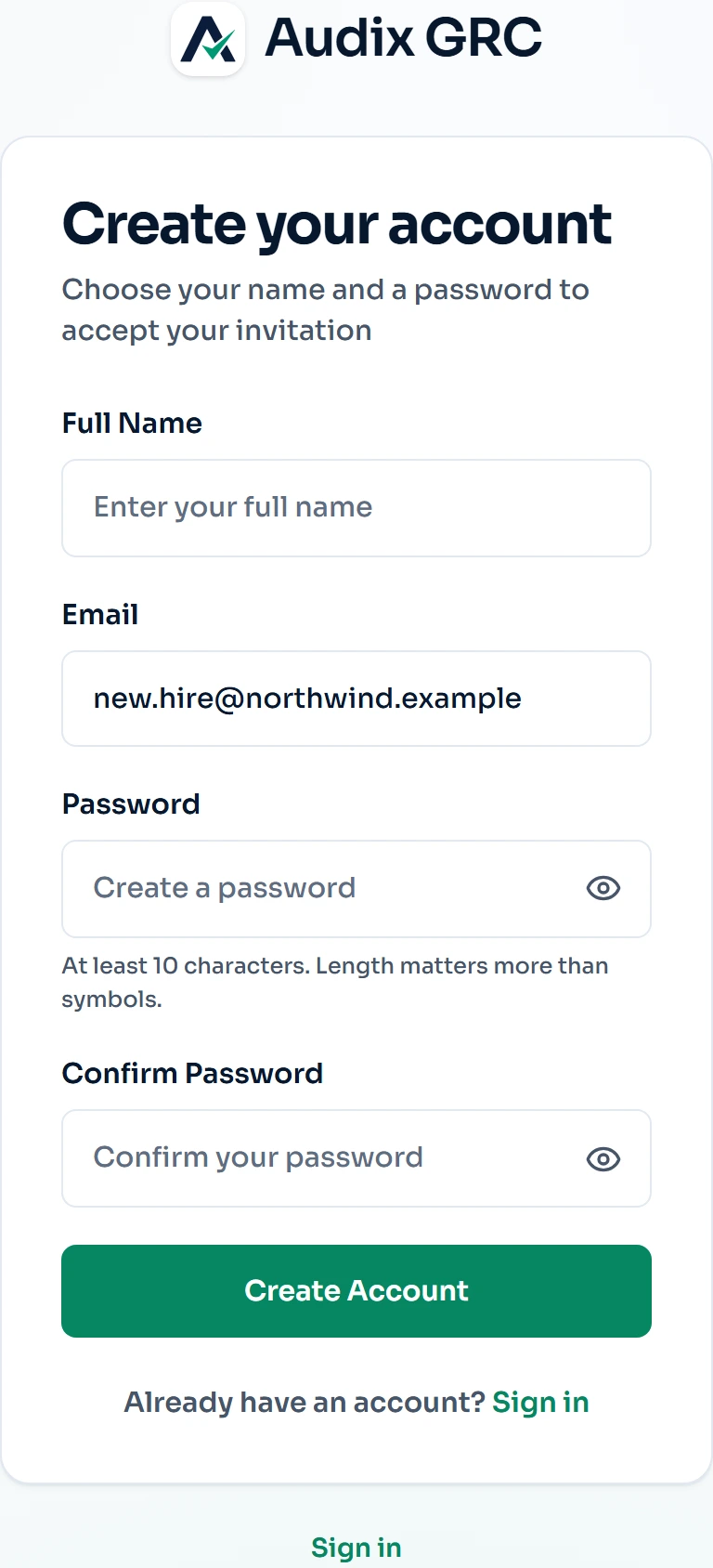
- The invited address, locked. The invitation was issued to this address and is checked against it, so the account cannot be created for anyone else.
- One password rule: length. Ten characters and no symbol requirements, stated here because it is exactly what the server enforces.
How an account comes into being
Full Name, Email locked to the invited address, Password ("At least 10 characters. Length matters more than symbols."), Confirm Password and Create Account. Without an invitation link it reads Get started with Audix instead: "Invited? Use the link in your invitation email. It brings you back here to set your password.", then Start a free 30-day trial for anyone new to Audix.
In Accounts and access
Tasks on this screen
Create your account from an invitationLive
Apart from starting a free trial, an invitation link is the only way to make an account yourself. The link carries the organization, the role and the address the invitation was sent to.
As a member
- Open the link in the invitation email. The card shows the organization, the role, the address it was sent to and when it expires.
- Click Accept & Create Account. The sign-up form opens with your email filled in and locked.
- Enter Full Name, Password and Confirm Password, then click Create Account.
- You see "Registration successful! Please verify your email." and land on the verification screen.
Rules that apply
- Your password must be 10 to 128 characters. The hint under the field says so: "At least 10 characters. Length matters more than symbols."
- Full name must be 2 to 150 characters.
- If the address already has an account you get "Email is already registered". Sign in instead, and accept from the banner.
- An expired invitation is refused with "This invitation has expired. Ask an administrator to send a new one." One that was used, withdrawn or replaced by a newer invitation is refused with "This invitation link is no longer valid. Use the link in your most recent invitation email, or ask an administrator to send a new one."
- Opening the sign-up page without an invitation link shows Get started with Audix instead of the form. Start from the invitation email, or start a free trial with Start a free 30-day trial.
- An invitation from a workspace that is on a free trial carries a Trial workspace label and "Only accept if you know who invited you.", on the invitation card, on the sign-up form and in the banner.
Start a free 30-day trialLive
A new company can try Audix on its own: prove a work email, choose a password, and get a workspace of its own with you as its first admin. Free for 30 days, and no card is asked for.
As someone new to Audix
- Click Start a free 30-day trial on the sign-in page, or open app.audixgrc.com/start-trial. The page at audixgrc.com/trial/ describes the trial and links there too.
- Enter your Work email, Full name and Organization name (your company or team: your workspace is named this), tick the box to agree to the Trial Terms and the Privacy Notice, and click Start my free trial. Ticking Send me product news (optional). is up to you.
- The page reads Check your inbox at …. Open the email "Finish setting up your Audix GRC trial" and click Finish setting up. The link works once, for 24 hours.
- On Finish setting up your trial, check the Organization name (keep it or change it: the workspace is named exactly this), choose a Password, type it again in Confirm password, and click Create my workspace.
- Set up two-step verification, which every trial workspace requires. You then land on Quick Start, which offers you its guided tour.
Rules that apply
- Use your work email. A personal or disposable address, a Gmail or Outlook.com one for example, is refused with "Please use your work email, or contact sales."
- The trial is for an address with no Audix account. If yours has one, the page still reads Check your inbox at …, and the email says you already have an account and how to sign in. To get a trial workspace for your team, email the sales address it names.
- Some requests are checked by hand before a trial starts. The email then reads "We're reviewing your Audix GRC trial request", and a second email follows: the link to finish setting up, or a note that a self-serve trial cannot start for this request.
- If your company already has a trial workspace, your request is reviewed by hand, and a link page can read "Your company already has an Audix trial workspace. Ask its admin to invite you, or contact sales@audixgrc.com." The quickest way in is an invitation from that workspace's admin.
- Resend waits about two minutes after each email, and one address gets at most three emails in a day. Use a different email goes back to the form.
- Opening the link only reads it. Nothing is created until you click Create my workspace, so a mail scanner that opens the link first does not use it up.
- An expired link reads "This link has expired or is no longer valid. Start again to get a new one." A used one reads "This link was already used to create a workspace. Sign in with your email and the password you chose."
- The password must be 10 to 128 characters. Your address is verified by the link, so there is no code to type.
- When sign-ups are closed the page reads "Free trials aren't open right now.", with the sales address to email or a demo to request at audixgrc.com. Too many requests from one network read "Too many trial requests have come from your network. Please try again later, or contact sales@audixgrc.com."
- Once the workspace exists you get "Welcome to your Audix GRC trial", which gives the date full access ends, when the workspace becomes read-only and locks, and when it is due to be deleted.