Screen 17 of 19 · Accounts and access
Settings, Security
Where an admin requires two-step verification of everyone in the organization, and resets the second step of a member who has lost it.
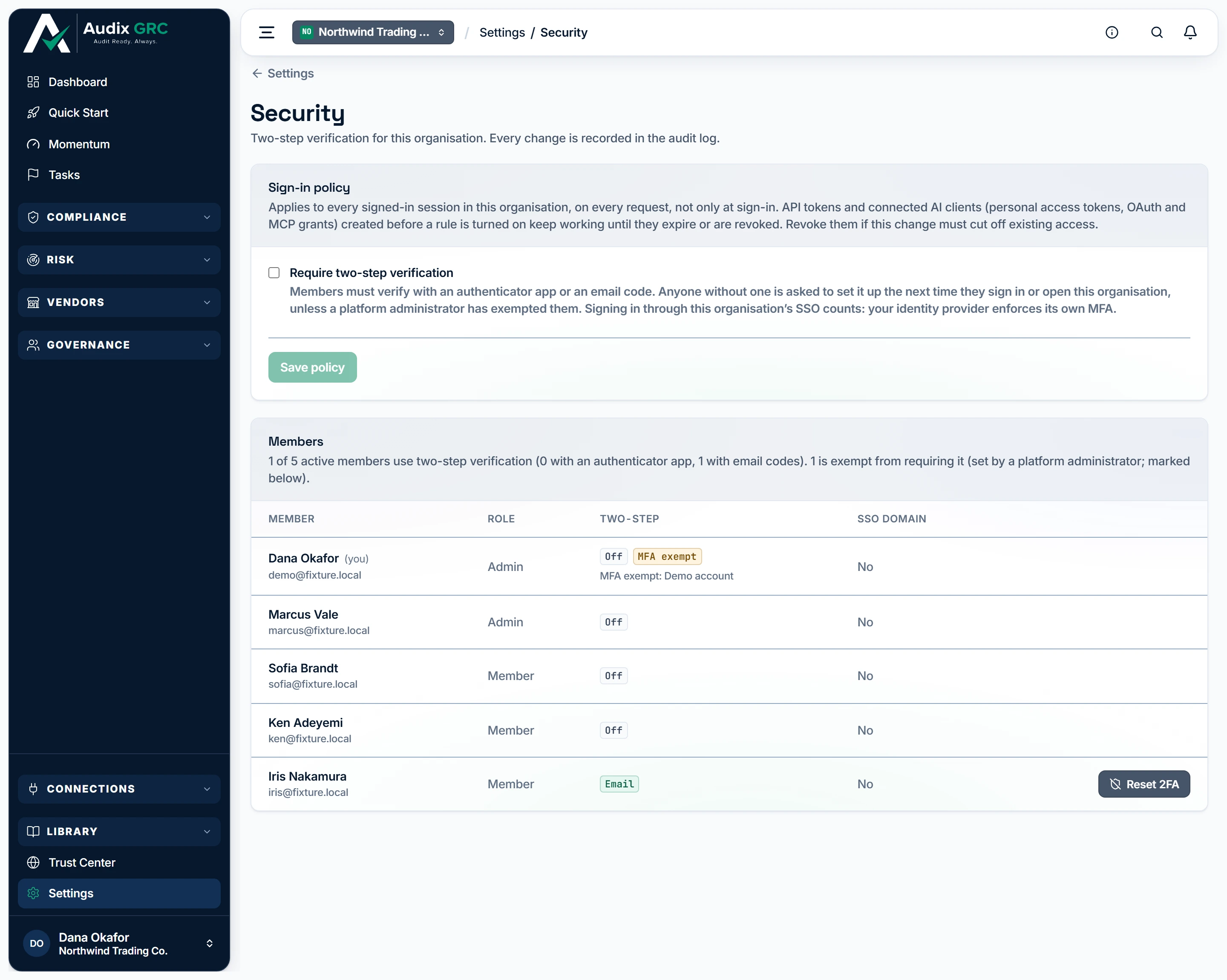
- Require it here. With Require two-step verification on, anyone without a second step is asked to set one up the next time they sign in or open this organization. It applies to every request, not only at sign-in.
- Who has a second step. Each member's role and method. A member Audix staff have exempted, a demo account for example, is marked MFA exempt with the reason given.
- Reset 2FA. For someone who has lost their phone and their recovery codes: it removes their methods and signs them out everywhere, and they set it up again at their next sign-in.
Sign-in policy with Require two-step verification and Save policy, then Members: each member's role and two-step verification, with Reset 2FA on the rows that have a method. In a free trial the box is ticked and cannot be cleared.
In Accounts and access
Tasks on this screen
Require two-step verification for your organizationLive
Make every member of the organization use a second step, not only the people who chose to.
As a member
- Not available. Settings, Security shows Administrators only and points you to your own two-step verification on your profile.
As an admin
- First set up two-step verification on your own profile, and sign in with it.
- Open Settings and click Security under Organization. The page reads "Two-step verification for this organisation. Every change is recorded in the audit log."
- In Sign-in policy, tick Require two-step verification. Before you save, the card says how many active members will be asked to set it up, and lists anyone who is exempt.
- Click Save policy. You see "Sign-in policy saved." Discard undoes a change you have not saved.
- Check the Members card, which counts who uses two-step verification: "N of M active members use two-step verification (x with an authenticator app, y with email codes)."
Rules that apply
- Members must verify with an authenticator app or an email code. Anyone without one is asked to set it up the next time they sign in or open this organization. Members exempted by Audix staff are not asked.
- The rule applies to every signed-in request in the organization, not only at sign-in. A saved change reaches every Audix server within about 30 seconds.
- You cannot turn it on until your own sign-in has proved two-step verification. The card says: "Set up two-step verification on your own profile and verify with it first, so this does not lock you out." Turning it off is allowed, except in a free trial.
- In a free trial the rule is on from the start and stays on: the box is ticked and locked, and its hint reads "Two-step verification stays on during a trial."
- API tokens and connected AI clients (personal access tokens, OAuth and MCP grants) created before a rule is turned on keep working until they expire or are revoked. Revoke them if the change must cut off existing access.
- Approving a new AI client, and deleting the organization, both apply the rule to the person doing it.
- Every change to the policy is recorded in the audit log.
Reset a member's two-step verificationLive
Get a colleague back in after they lose their phone and their recovery codes.
As a member
- Not available. Ask an admin of your organization.
As an admin
- Confirm who you are speaking to before you do this.
- Open Settings, Security and find the person under Members. The Two-step column reads App, Email, App + email or Off.
- Click Reset 2FA on their row. Reset two-step verification? says every method they have and their recovery codes will be removed.
- Click Reset two-step verification. The toast confirms their sessions ended.
Rules that apply
- Every device they are signed in on is signed out. If the organization requires two-step verification, they set it up again at their next sign-in.
- You must have verified your own sign-in with two-step verification first: "Verify your own sign-in with two-step verification before resetting someone else’s."
- You cannot reset your own here. Use your profile.
- Reset 2FA appears only on the rows of members who have a method. If the person also belongs to another organization, Audix staff have to reset it for them.
- Where Audix staff have exempted someone from required two-step verification, their row carries MFA exempt and the reason.
- They receive the email "Your Audix GRC two-step verification was reset", and the reset is in the activity log.
3 questions
Questions about this screen
How do I require two-step verification for everyone in my organization?
As an admin, first set up two-step verification on your own profile and sign in with it. Then open Settings, Security, tick Require two-step verification and click Save policy. Members without a method are asked to set one up the next time they sign in or open the organization.
Do API tokens keep working after we require two-step verification?
Yes. Personal access tokens and connected AI clients created before the rule was turned on keep working until they expire or are revoked. Revoke them if the change must cut off access that already exists.
How do I reset a colleague's two-step verification?
Open Settings, Security, find them under Members, click Reset 2FA and confirm. This removes every method they have and their recovery codes, and signs them out on every device. You must have verified your own sign-in first. If the person also belongs to another organization, Audix staff have to reset it for them.