Screen 03 of 8 · Connections
Add a connection
Where an admin connects a tool: pick it, read what it collects, paste the credential, and Audix checks it with the tool before saving.
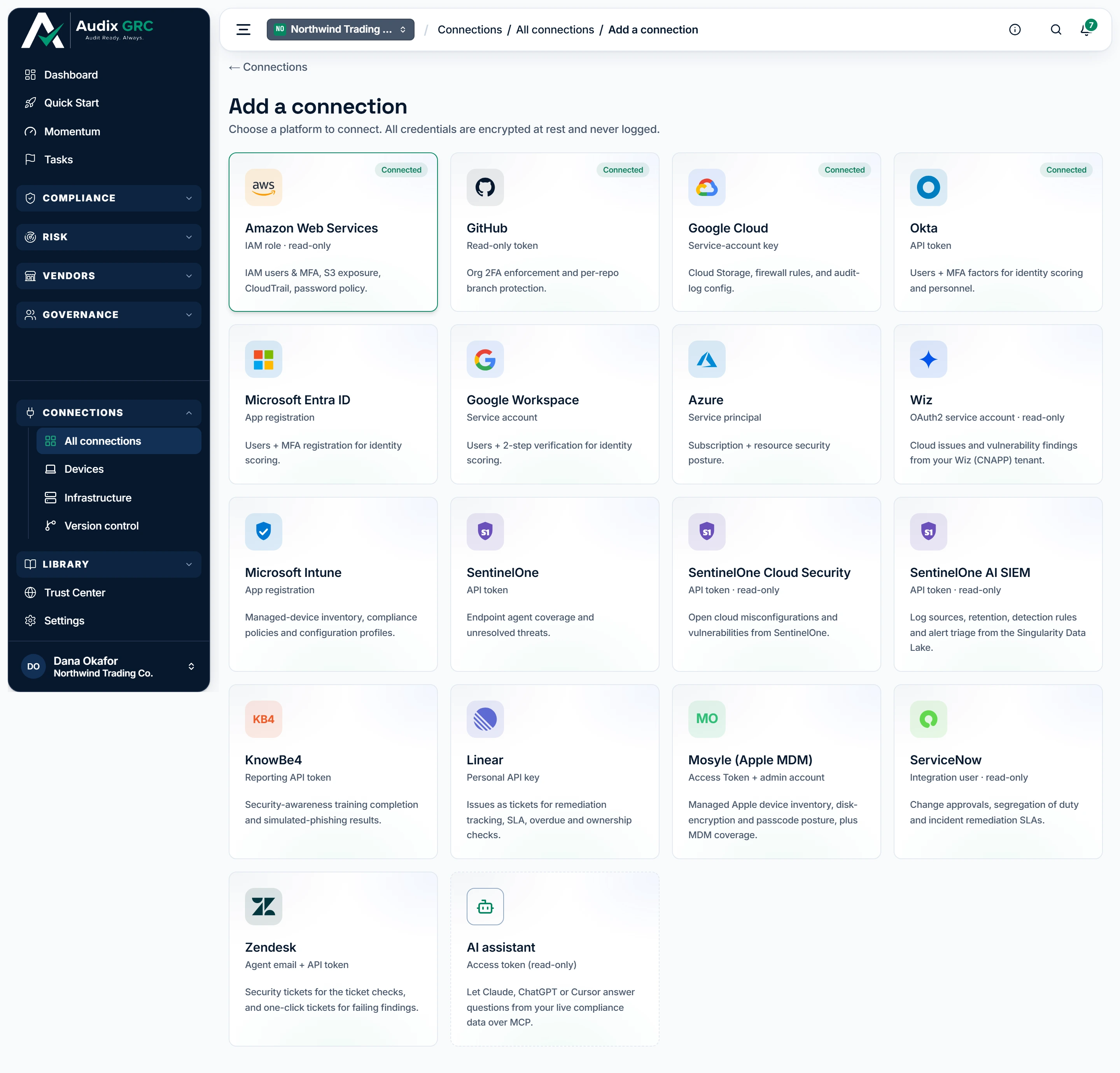
- Already connected. A tool you have connected stays in the picker, because you can connect the same one twice - two AWS accounts, say.
- Not only cloud platforms. Device managers, endpoint agents, training tools and ticketing systems are connected the same way, and every card states what it will read.
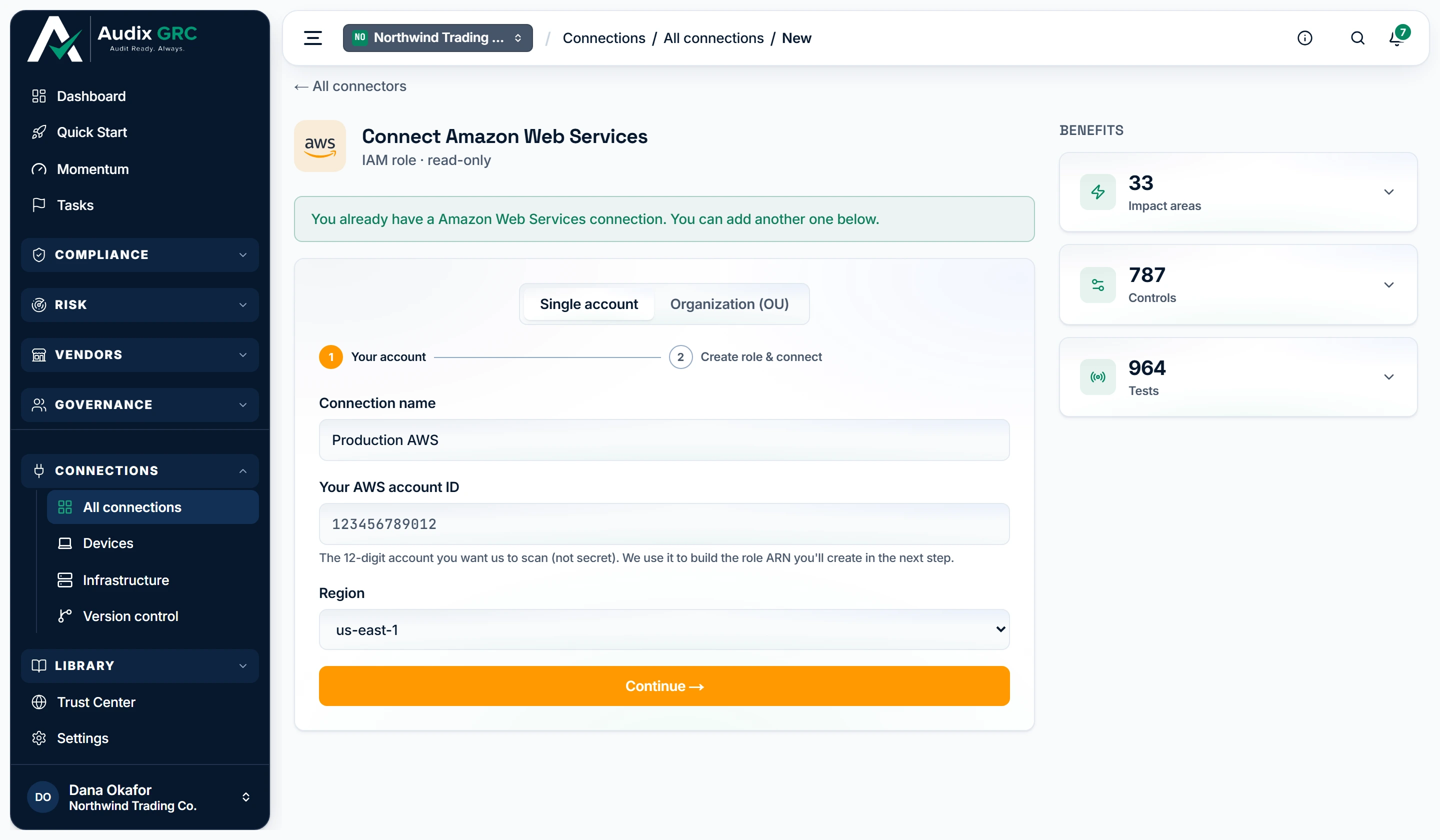
- What connecting it switches on. The controls and tests this one tool would start evidencing, counted before you connect it, and each number opens to the list behind it.
- The role lives in your account. Step two hands you a CloudFormation template that creates a read-only role trusting this platform, so no AWS key is ever typed in here or stored.
Nothing is stored until the credential works
Wider than this screen: swipe sideways across the flow to follow it.
A grid of every tool you can connect, plus an AI assistant tile. Picking a tool opens a three step form: Provider, Capabilities, Connect. AWS has its own wizard. A side panel says what connecting it switches on before you hand anything over.
In Connections
The task on this screen
Connect an AI assistantLive
Let Claude, ChatGPT or Cursor answer questions from your live compliance data, read-only.
As a member
- Click Connect an AI assistant on Connections. Admins also find an AI assistant tile on Add a connection.
- Your client: choose Claude or ChatGPT (sign in), Cursor, scripts or CI (access token) or No direct access (local bridge).
- For Claude or ChatGPT, pick Team or Enterprise or Pro or Max, copy the Server URL, and add it as a custom connector in your client. On Team and Enterprise plans only a Claude workspace Owner can add a connector, so Copy steps for your Owner gives you the steps to send them.
- For Cursor, scripts or CI, give the token a Token name, click Create read-only token, and copy the token (shown once) and the configuration block into your client. Then click Test connection.
- A signed-in assistant verifies itself. Ask it something to confirm, for example what is blocking SOC 2.
As an admin
- Same as a member.
Rules that apply
- It is read-only and scoped to one organisation, and it never sees more than your own account can.
- It can read your compliance posture, controls, risks, vendors and policies.
- A token made here is read-only and expires after 365 days.
- Signed-in assistants are listed under AI assistants on the Connections page, with when each last read anything. Revoke one in Settings, under API Keys.
5 questions
Questions about this screen
How do I connect Zendesk to Audix?
An admin opens Connections, clicks + Add connection and picks Zendesk. In Zendesk, open Admin Center > Apps and integrations > APIs > OAuth clients and add an OAuth client: give it an Identifier, set Client kind to Confidential, and copy its Secret (Zendesk shows it once). Then enter your subdomain (acme for https://acme.zendesk.com), the Identifier and the Secret, and Audix checks them with Zendesk before saving anything. Zendesk no longer issues API tokens; one made before 27 October 2026 works until 30 April 2027.
Which Microsoft Graph permissions does the Entra ID connection need?
Add the Microsoft Graph application permissions User.Read.All, AuditLog.Read.All, Organization.Read.All, RoleManagement.Read.Directory, Policy.Read.All, GroupSettings.Read.All, Application.Read.All and GroupMember.ReadBasic.All, then choose Grant admin consent. All of them are read-only. The multi-factor and sign-in checks also need an Entra ID P1 or P2 licence on the tenant, and without one they show as not verified, never as failed.
What permissions does the GitHub token need?
Use a fine-grained token owned by the organization, all read-only, with repository permissions Actions, Administration, Contents and Metadata and organization permissions Administration and Members, or a classic token with repo and admin:org. Create it as an organization owner: the security checks need an owner's token, and with any other token they show as unknown, never as failing. Only a classic token can read whether SAML is configured.
Can SentinelOne Cloud Security and AI SIEM reuse my existing SentinelOne token?
Yes. When you already have a SentinelOne connection, the form offers Use the token from your SentinelOne connection: Audix copies the token it already holds, uses that connection's console URL, and changes nothing in SentinelOne. Disconnecting the original leaves each copy working, so disconnect the copies too to stop Audix reading SentinelOne.
Why was my SentinelOne Cloud Security connection refused?
Audix refuses it until at least one cloud account or Kubernetes cluster is onboarded in SentinelOne Cloud Native Security and has finished a scan, so nothing can pass on an empty scan. The token must belong to a service user at Account or Site scope with at least the Viewer role, because Global-scope tokens are refused.