Screen 05 of 6 · Vendor questionnaires
Answer the questionnaire
The page your vendor answers on: a private link, no sign-in, answers saved as they go, file uploads, and a submit that closes the link.
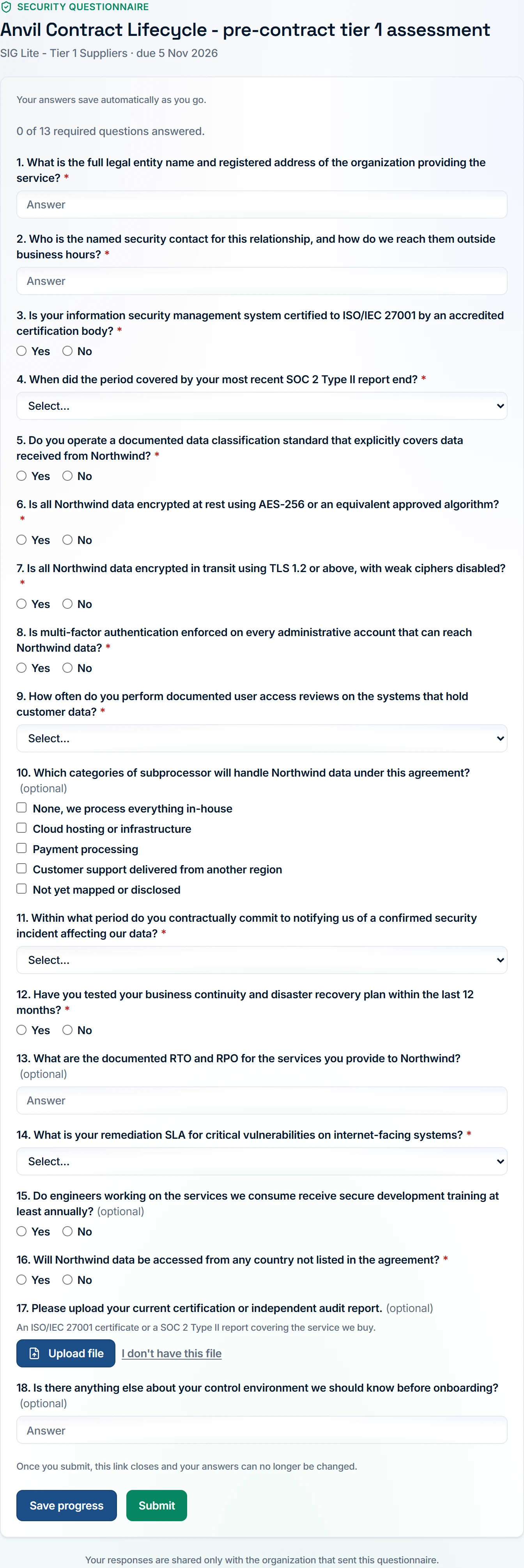
- What is still outstanding. Counts only the questions that must be answered, so the vendor knows what stands between them and being able to submit.
- Saying so is an answer. A document a supplier genuinely does not hold is recorded with their reason, which reaches the reviewer as a decision to make rather than as a chase.
- Submitting closes the link. Answers save on their own until this point; afterwards the link stops working and nothing can be changed, which is why the warning sits directly above it.
The private link, and the three ways it ends
Wider than this screen: swipe sideways across the flow to follow it.
The questions, the upload controls, and the save and submit buttons. After submission it shows that the link is no longer valid. When a free trial workspace sent it, a note at the top reads Sent from a free trial workspace.
2 questions
Questions about this screen
Does a vendor need an Audix account to answer a questionnaire?
No. The vendor opens the private link with no account and no sign-in, answers, uploads documents and presses Submit. Answers save as they go, and Save progress lets them come back on the same link. The link works for 30 days and closes once they submit.
What files can a vendor upload to a questionnaire?
PDF, PNG, JPEG, GIF, WebP, plain text, Word, Excel and PowerPoint, up to 5 MB each, 5 per question, and 20 files or 25 MB per questionnaire. CSV is refused on purpose, and so is a file whose contents do not match its type. Files are not scanned for viruses.