Screen 02 of 6 · Vendor questionnaires
Questionnaire detail
One questionnaire a vendor answered: the risk band, gaps and flags, the internal review, and every question with the answer it got.
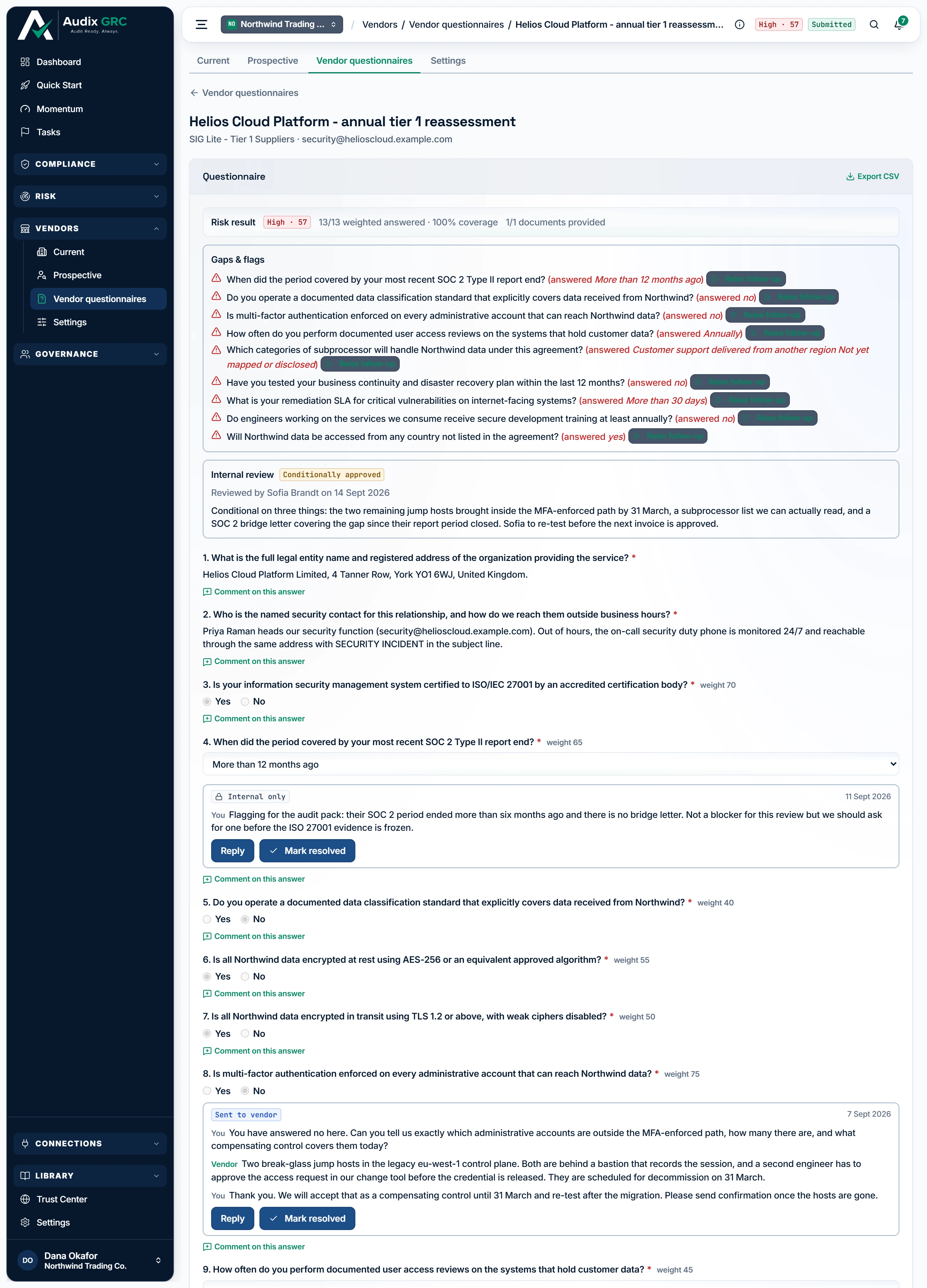
- One band, and what it rests on. The score comes only from the questions that carry weight, so the coverage figure beside it says how much of the form the band is actually based on.
- Turn a risky answer into work. This panel is rebuilt from the answers every time the page opens and remembers nothing, so raising a follow-up is what makes somebody responsible for closing it.
- Your own verdict, recorded once. Kept apart from anything the vendor wrote, and refused a second time: approved, conditionally approved or not approved.
- A question the vendor can see. Every thread says which it is, because a note meant for colleagues that lands in a supplier's inbox cannot be recalled.
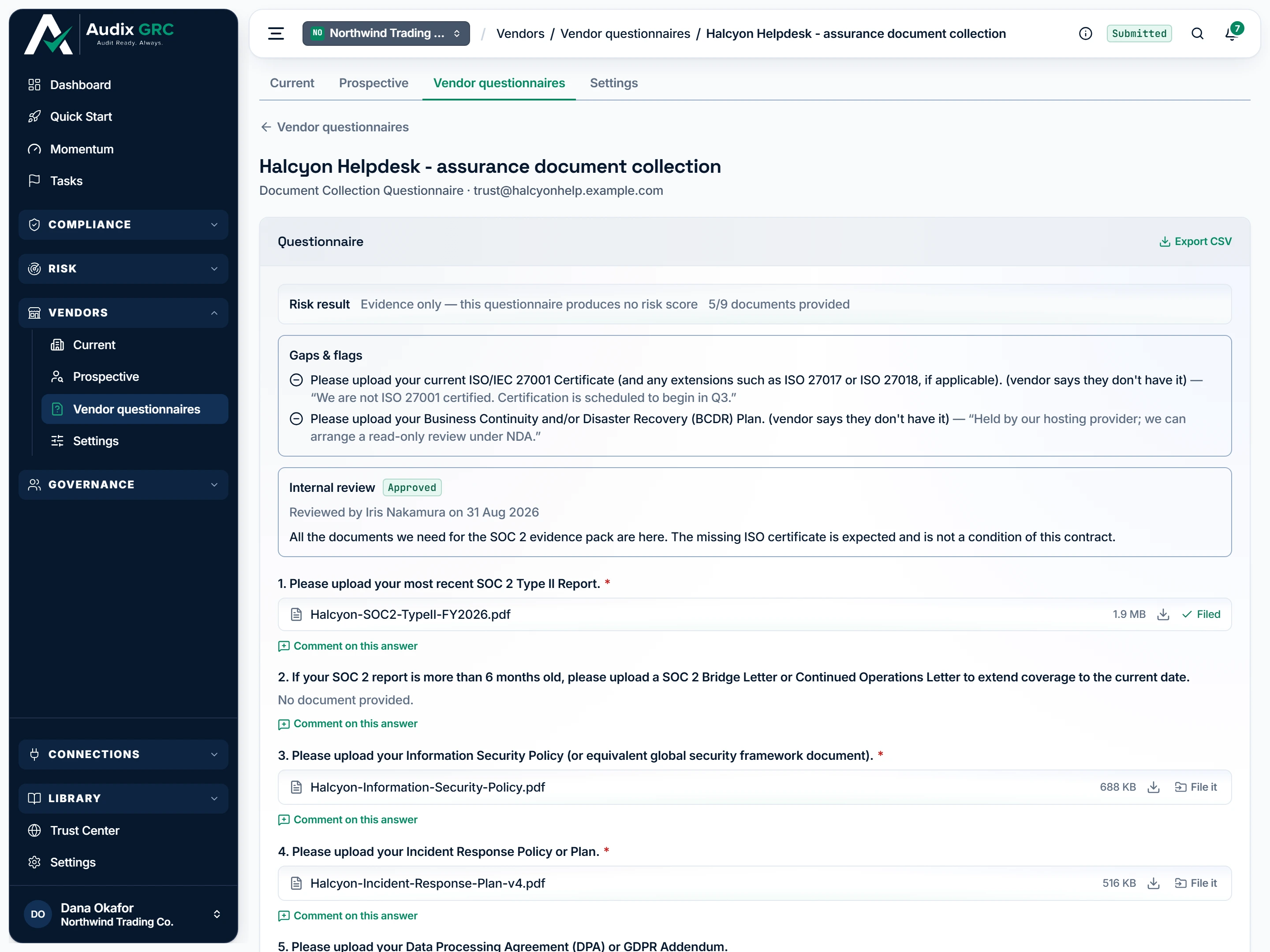
- No score, and that is correct. Nothing in this questionnaire carries weight, so there is no band to give; the strip counts documents instead, which is the only signal this kind of questionnaire carries.
- Handed over as a download. Files arrive from outside your organisation and are never opened in the browser, whatever they claim to be.
- Keep it with the vendor. Copies the document into that vendor's own records, so deleting this questionnaire later cannot pull the file back out again.
What a submission changes outside itself
Wider than this screen: swipe sideways across the flow to follow it.
Status and risk pills, Export CSV, the risk result, Gaps & flags, the internal review panel, and every question with the answer it got.
In Vendor questionnaires
Tasks on this screen
See what is wrong with a submissionLive
After a vendor submits, say what is actually outstanding, in four kinds that mean four different things.
As a member
- Open a submitted questionnaire and read Gaps & flags above the questions.
- Risky answers come first, in red, each with the answer that triggered it.
- Then scorable questions left unanswered, then required documents that never arrived, then documents the vendor said they do not have, with their reason.
- When nothing is outstanding the panel says every weighted question was answered with no risk flags, and whether every requested document arrived.
As an admin
- Same as a member, plus Raise follow-up beside any risky answer.
- Click it to turn that answer into a tracked follow-up on the vendor, which records the questionnaire it came from.
Rules that apply
- A risky answer is one scoring 60 or more.
- Documents are counted separately from coverage. A document questionnaire has no weighted questions and would otherwise report full coverage for a vendor who uploaded nothing.
- The panel is rebuilt every time you open the page and remembers nothing. Raise follow-up is what turns a noticed risk into something tracked.
Export a completed questionnaireLive
Take a finished questionnaire out of the product as an audit artefact.
As a member
- Open a questionnaire and click Export CSV in the Questionnaire card header.
- A file downloads, named after the questionnaire.
- It opens with a header block naming the questionnaire, the template, the status, the submission date, the risk, and the review decision and note.
- Below that is one row per question, with its type, whether it was required, the answer, the documents and the follow-up messages.
Rules that apply
- Only follow-up messages the vendor could see are exported. Internal notes stay out of the file you hand to a third party.
- A document answer reads as a document provided. A declaration reads that the vendor stated they do not have it, with their reason.
- A follow-up the vendor was never shown reads "Not asked".
- Cells that start with a formula character are prefixed with an apostrophe, so a vendor's text cannot run as a formula in Excel.
4 questions
Questions about this screen
How is a vendor questionnaire scored?
Only weighted questions count, so Free text, Upload a document and anything with weight 0 are left out. Each scored answer is worth 0 to 100, and the weighted result gives a band: none below 10, minor below 30, moderate below 55, high below 80 and critical from 80. Below 50 percent coverage the score is shown but no band is given and the vendor is not changed.
What does Awaiting review mean on a vendor questionnaire?
The vendor has submitted, but nobody has recorded the internal sign-off yet. An admin or an approver opens the questionnaire, picks Approved, Conditionally approved or Not approved under Internal review, and presses Submit review. The decision is recorded once and cannot be changed.
A vendor says the questionnaire link is no longer valid. What do I do?
The link closes when the questionnaire is submitted or 30 days after it was created, and every refusal reads the same way. If it is not submitted yet, open the questionnaire, press Resend invite and then Send it. The vendor gets a new link with a fresh 30 days and keeps the answers saved so far, and the old link stops working.
Who can download the files a vendor uploaded to a questionnaire?
Only admins. The download icon shows for everyone, but anyone else gets an error instead of the file. Every download is written to the activity log, which admins read under Events as "Downloaded a questionnaire file".