Screen 01 of 19 · Accounts and access
Sign in
Sign in to Audix GRC with your email and password, then the second step when your account or organization uses two-step verification.
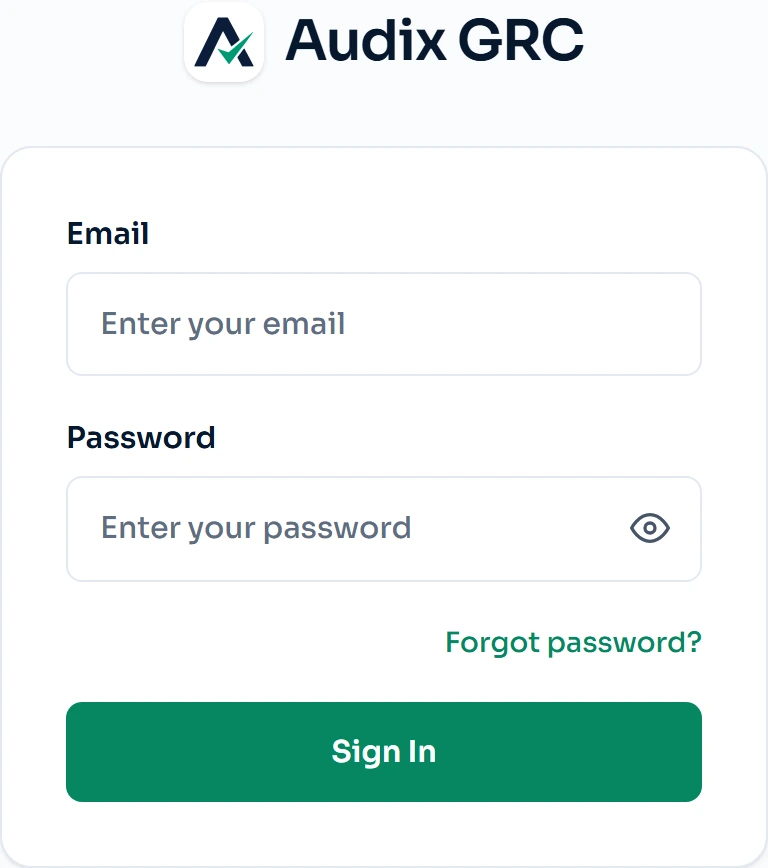
- Sign in with your work address. One account carries across every organization you belong to, so this address is who you are rather than where you work.
- Forgot password. Sends a code to that address and lets you set a new password yourself, without an administrator.
What the sign-in decides
Wider than this screen: swipe sideways across the flow to follow it.
Email, Password, a show and hide toggle, Forgot password? and Sign In. Under the button, New to Audix? Start a free 30-day trial opens the trial sign-up. An account with two-step verification goes on to a second screen for its code.
In Accounts and access
Tasks on this screen
Sign inLive
Exchange your email and password for a session, and land in one of your organizations.
As a member
- Open the sign-in page, type Email and Password, click Sign In.
- The screen says "Signing you in..." and takes you to the dashboard of your first organization.
- If your account has two-step verification, or an organization you belong to requires it, the Two-step verification screen asks for the second step before anything opens.
- If Audix staff set your password for you, you land on Choose your own password instead.
- Errors appear on the form: "Invalid credentials", or "Too many failed sign-in attempts. Try again in a few minutes."
Rules that apply
- Ten failed attempts within fifteen minutes lock that address out until the window passes. A successful sign in, a password change or a password reset by Audix staff clears the count. A reset by email code does not, so wait for the window to pass.
- An account that has not verified its email yet is taken to the verification screen to finish, rather than refused.
- A disabled account gets "Invalid credentials".
- If Audix cannot be reached, the form says "We couldn't reach Audix just now. Please try again in a moment." rather than blaming your password.
- Belonging to no organization takes you to a screen that says so, or that shows the invitation waiting for you.
- If the organization you open is locked, a trial past its read-only days or a workspace Audix staff have paused, the Workspace paused page replaces the app.
- A link carrying
?from=/some-pagereturns you to that page after sign in, through the second step too. - Opening the sign-in page while already signed in shows the form again rather than the dashboard.
- Each sign-in opens a session of its own. Signing in on a second device leaves the first one signed in.
- Every sign-in attempt is recorded. A successful one also appears on the Events page of each organization you are an active member of; a failed one does not, unless it is the attempt that locks the account.
Get back in when you lose your second stepLive
What works when your phone or your inbox is out of reach, and what happens after too many wrong codes.
As a member
- Lost your phone? At sign-in choose Use a recovery code and enter one of your saved codes. Then use Move to a new phone on your profile, or set the method up again.
- No recovery codes either? Ask an administrator of your organization to reset your two-step verification. You set it up again at your next sign-in.
- Codes paused? Use a recovery code, or reset your password with Forgot password? on the sign-in page. Either ends the pause.
Rules that apply
- Wrong codes in a row are counted across the app, email codes and recovery codes, with no time limit. After 100 in a row, codes from the app and from email are paused, and you get the email "Two-step verification codes are paused on your Audix GRC account".
- While codes are paused, the screen says: "Codes from your authenticator app and email are paused after too many wrong attempts. Use one of your recovery codes, reset your password with “Forgot password” on the sign-in page, or ask an administrator of your organisation to reset your two-step verification."
- If the pause comes before any method was set up, setting one up is paused too, and Reset my password is offered.
- A reset by an admin removes every method and your recovery codes, and signs you out on every device.
Reset a forgotten passwordLive
Set a new password using a code sent to the address on the account.
As a member
- Click Forgot password? on the sign-in screen, type your email, click Send Reset Code.
- The reset screen opens whether or not that address has an account. The product never says which.
- Open "Password Reset OTP - Audix GRC". The six digit code lasts 10 minutes.
- Type the code, a New Password of at least 10 characters, and Confirm Password. Click Reset Password.
- You see "Password reset successful!" and go to the sign-in form.
Rules that apply
- A reset also marks your address verified, so an account that never finished verification is not stuck at the verification step.
- A reset ends every session of your account on every device, the same as changing your password does. You sign in again with the new one.
- A reset ends a pause on two-step codes. Your two-step verification stays on, so the next sign-in still asks for the second step.
- Resend code waits 60 seconds on screen and two minutes on the server.
- A wrong code gives "Invalid email or OTP". An old one gives "OTP has expired. Please request a new one".
- Each reset code allows five tries. After the fifth wrong one it stops working and reads as expired, so request a new code.