Screen 01 of 5 · Controls and Frameworks
Controls
Every control in scope, worst health first, with readiness tiles, filters and a preview, so you can see what needs work across your frameworks.
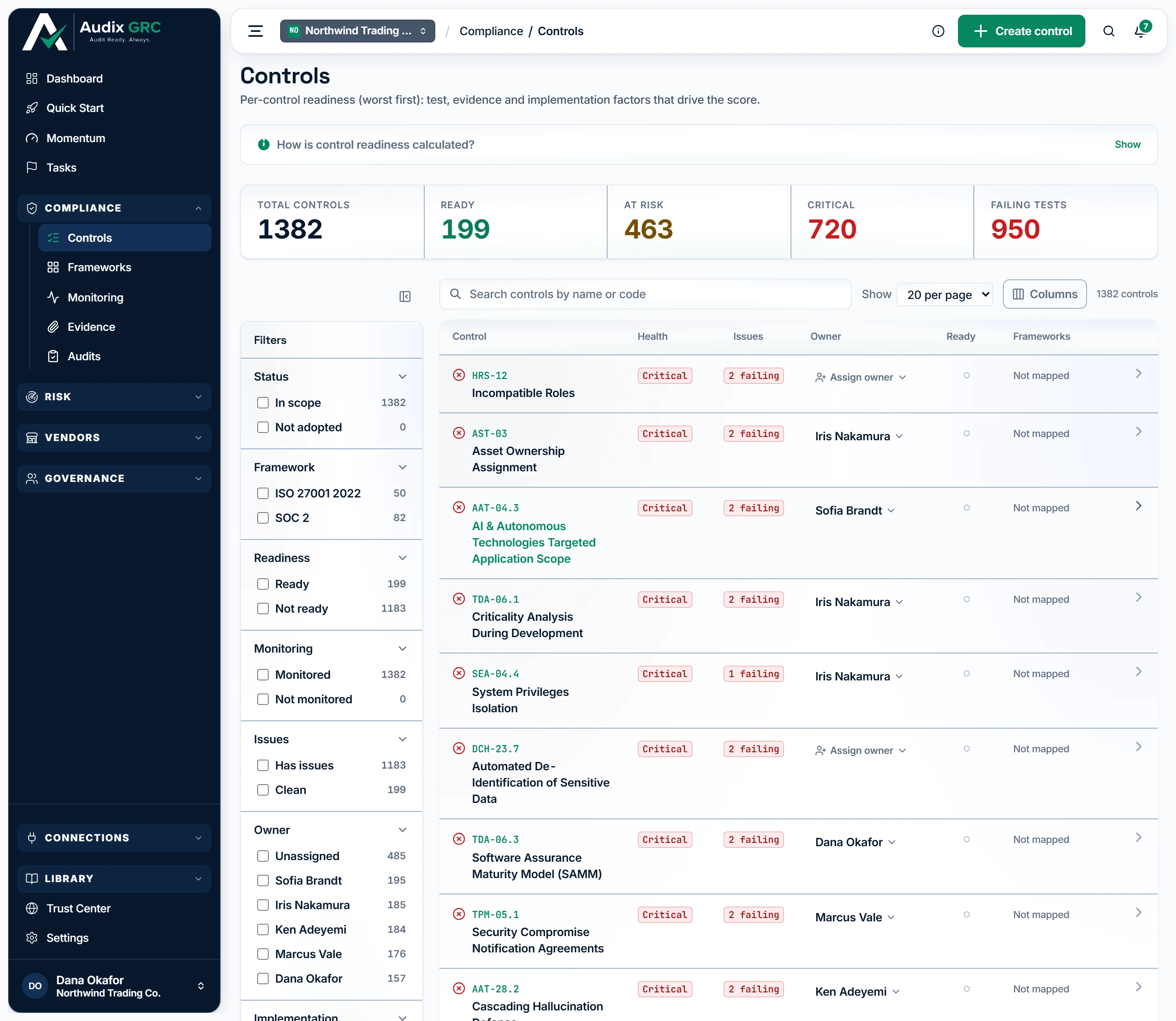
- Where the whole estate stands. Every control in scope counted by health band, so you know how much is ready before opening anything.
- Narrow it to the work in front of you. Each filter carries its own count, so you can see how many controls are unowned or failing before you click.
Every control in scope, worst health first, with tiles for Total controls, Ready, At risk, Critical and Failing tests, a filter rail, search, sortable columns and a preview drawer.
Audix GRC Controls: see exactly what is left to do
In Controls and Frameworks
Tasks on this screen
Find the control you needLive
The working list of every control in scope, worst health first, with the filters to find what is broken, unowned or waived.
As a member
- Open Controls. Read the tiles: Total controls, Ready, At risk, Critical, Failing tests.
- Filter with the rail: Status, Framework, Readiness, Monitoring, Issues, Owner, Implementation and Exception. Each option carries its own count, and applied filters show as chips with Clear all.
- Search by code or title in Search controls by name or code.
- Sort by clicking a column header: Control, Health, Issues, Owner, Ready, Monitoring or Frameworks.
- Use Columns to show or hide Health, Issues, Owners, Monitoring, Frameworks and Description, and to switch between comfortable and compact rows.
- Click a row for the preview drawer, or the control name for the full page. On a phone the table becomes cards.
As an admin
- Same as a member, plus Create control in the header.
- Set an owner straight from the Owner cell without opening the control.
- Use Exclude from framework in the preview drawer to start an exception.
Rules that apply
- Below the table, a line counts the controls marked not applicable and left out of the list and your score. Open it to see each one with its reason, who marked it and when.
- The list holds only controls that carry a score. A control set to Not applicable drops off it at the next rescore, and so does one you un-adopt.
- Monitored means at least one bound check has produced a result. Issues means failing checks, or evidence that is not fresh.
- The Description column is empty on every row, which is why it is hidden by default.
- The list stops at 2,000 controls and says "showing first 2,000" when it does.
- Health bands here are Healthy at 80 and up, At risk 50 to 79, Critical below 50. The control page uses different cut points.
- A link to a framework you have not adopted shows a panel with the control count it would bring, instead of an empty table.
- Your column and density choices are remembered in your own browser.
Track a control the catalogue does not haveLive
Record and score a control of your own that no framework in the catalogue asks for.
As a member
- A custom control carries a Custom pill and the banner "Not counted toward framework readiness yet."
- Work its checklist, manual checks and evidence like any other control.
- You cannot create, edit or delete one.
As an admin
- On Controls, click Create control.
- Fill Code, which must be unique in your workspace and at most 64 characters, and Title, at most 200. Control statement, Description and Weight from 1 to 100 are optional.
- Click Create control. It is created, adopted for you, and you land on its page.
- Use Edit on the Info card to change it, then Save changes.
- Use Delete and confirm to remove it.
Rules that apply
- A duplicate code is refused with "A custom control with code '<code>' already exists".
- A custom control has no crosswalk, so it never moves a framework percentage or the organisation score, and it has no Frameworks tab or SCF credit line.
- Its checklist starts empty. Nothing is inherited from the catalogue.
- Delete removes the adoption, the checklist, the manual checks, the check bindings, the evidence links and the score, then returns you to Controls.
3 questions
Questions about this screen
Can I add my own control that is not in the catalogue?
Yes. An admin clicks Create control on Controls and gives it a unique code and a title. A custom control is scored like any other, but it has no crosswalk, so it never moves a framework percentage or the organisation score.
Where does the Audix control catalogue come from?
Controls, frameworks and the mappings between them come from the Secure Controls Framework (SCF), © Secure Controls Framework Council, LLC, used under CC BY-ND 4.0. The content is shown as published, so a control's name and description read the same for every organisation. Requirement wording is not published in the crosswalk, so you see codes and mappings.
Where can I see the controls marked not applicable?
Below the table on Controls, a line counts the controls marked not applicable. Open it for each one with its reason, who marked it and when. Each audit also lists them under Controls marked not applicable in its Disclosures, and the full evidence bundle carries them in its own CSV.