Screen 04 of 8 · Dashboard and setup
Momentum
See whether your compliance work is moving: progress against your own past, who owns what is open, integration coverage and how you compare.
Five stacked panels. Momentum holds the dial with your altitude band, the three streak rows, the milestones, and Worth doing next with the Flight plan under it. Mission Control holds the countdown to your nearest open audit, Go / No-Go for each framework you are pursuing, and the Flight recorder. Then Crew, Coverage from your integrations and How you compare.
Audix GRC Reports: monthly progress and audit readiness
In Dashboard and setup
Tasks on this screen
Measure progress against your own pastLive
Show whether you are improving compared with your own history, and rank the open work by what the scorer says each item is worth.
As a member
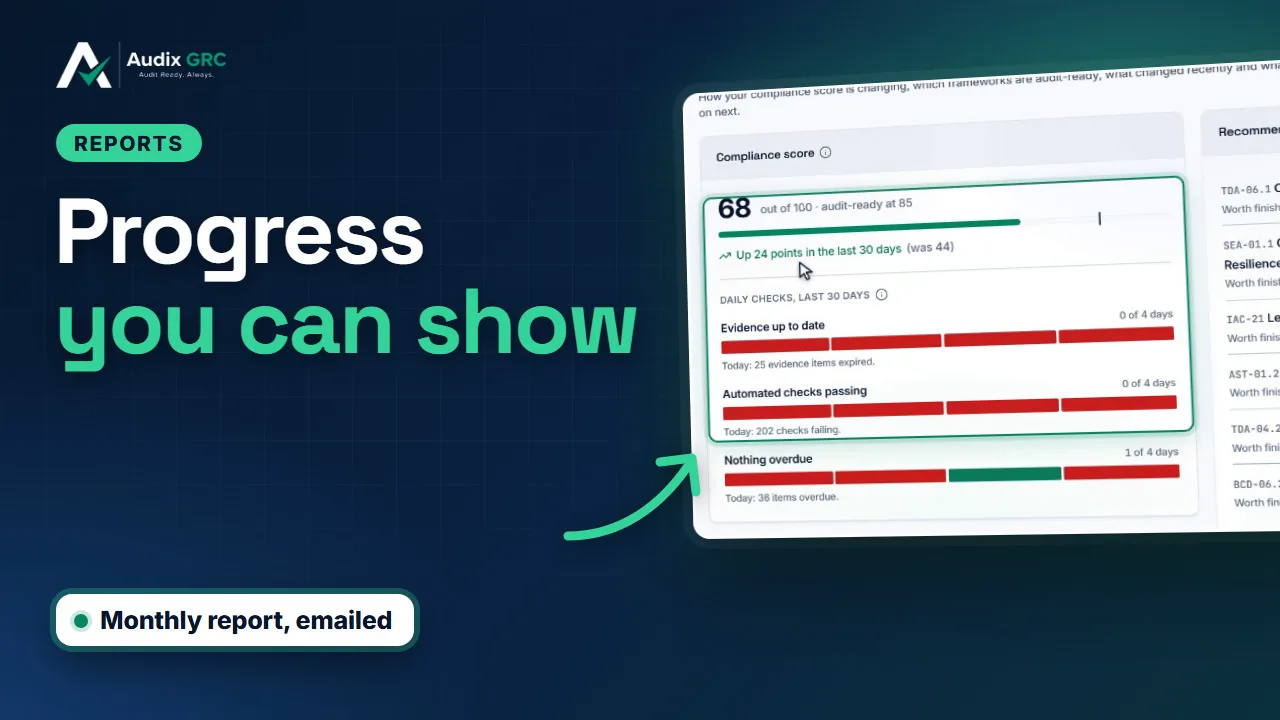
- On the dashboard, read the Momentum card: the score, / N to be ready, the 30 day change, an N-day streak flame when a run is live, and Best N.
- Read the day grid under Last N days. Three rows, Evidence fresh, Checks green and Nothing overdue, one cell per day. Filled means the run held, hollow means it broke, faint means the day was not measured.
- Click the card to open Momentum.
- Read the dial: the score, the projected arc for the best next move, the altitude band (On the pad, Taxiing, Climbing, Cruising, Cleared) and Ready at N.
- Read the three streak rows, each with its own 30 cell strip, and the coaching sentence above them when one is offered.
- Read the milestone list: the ones already banked, the next open one, and how many follow.
- Read Worth doing next: the impact against effort chart, up to four ranked rows, and the Flight plan under them.
Rules that apply
- Streaks are measured from the daily snapshots, not from signing in. A day with no snapshot ends the run instead of being counted through. There is no login streak, on purpose.
- Each day has three states, not two: the run held, the run broke, or the day was not measured. That keeps a streak of zero apart from not having watched long enough.
- A check switched off while it was failing still breaks the Checks green run, because readiness keeps counting that failure. A check switched off while it was passing, or not applicable, never breaks it.
- Evidence fresh counts the current evidence for each check, not copies it has since replaced.
- The milestones are first framework ready, health past 25, 50 and 75, and a clear month each on evidence, checks and deadlines. A milestone is claimed only once the history shows the crossing.
- Best N is the largest 30 day gain in your own history. A personal best needs the current 30 day change to be positive and at least as large.
- The ranking is not a guess. The scorer is run once for each candidate control to get its exact projected gain.
- Effort comes from the control's own state. A check that is already wired and failing is the cheapest fix. Missing or stale evidence sits in the middle. A control with no automated check at all is the most expensive.
- A momentum read that fails says so. It is never shown as a score of zero.
Plan a combination of fixesLive
Answer what it would take to reach a given score, for several fixes together rather than one at a time.
As a member
- On Momentum, scroll to Flight plan under the ranked list.
- Tick up to eight controls. Each row shows its reference, its title, and either +N on its own or No change on its own.
- The footer recalculates: N selected, the score you are on and the score you would land at, and Lands at with the altitude band.
- If the plan unlocks requirements, a line says how many, across how many frameworks.
Rules that apply
- Each tick sends the same change the ranked row was labelled with, so the total is built from the same arithmetic as the per row figures above it.
- The result is not the sum of the individual gains. Two fixes that feed the same requirement gain less together than their two numbers added up.
- The board takes eight controls at a time.
Answer whether you could go todayLive
Say per framework whether you would pass right now, show what recently crossed a threshold, and count down the nearest open audit.
As a member
- On Momentum, read the countdown card when an audit is open: Launch window closes, the audit name and close date, the days left, then your measured pace and the score you arrive at.
- Read Go / No-Go with N/M GO beside the title. Each framework you are pursuing is one row reading GO or NO-GO, with either All N mapped controls ready. or N of M controls still holding it.
- Read Flight recorder: up to twelve recent crossings, each as the subject plus reached GO, dropped to NO-GO, came online, went offline or moved N to M, with a relative time.
Rules that apply
- The board lists only the frameworks you selected. Without that filter it would read NO-GO against hundreds of standards nobody chose.
- The countdown picks the soonest audit that is active, in review or awaiting changes and has an end date.
- The arrival estimate is a straight line drawn from your measured 30 day pace, held between 0 and 100, and shown only while the audit is still ahead. It is an extrapolation, not the scorer's forecast.
- The pace can be negative, and the card says so rather than only congratulating you.
- Every line in the flight recorder is a crossing written by the scorer. None of them records someone opening a page.
See what each integration coversLive
Say what each connected tool covers of the controls you have adopted, and what connecting one more would add.
As a member
- On Momentum, read Coverage from your integrations.
- The bar splits your adopted controls into automated and manual.
- Under Connected, each live tool shows how many controls it covers and the passing, failing and awaiting data split.
- Under Would add coverage, up to four tools you have not connected show Connect <name> and +N controls. Click one to start.
- Counts are net: only controls you have adopted that nothing already connected can check.
As an admin
- Everything a member does.
- You are the only one who can finish the connection.
Rules that apply
- A connection that is erroring still counts as connected, so it does not reappear as something to go and set up.
- The controls covered figure cannot be added up across tools. Two tools can cover the same control.
- Putting a control under a check does not make it pass.
- The whole card is hidden until you have adopted controls, because there would be no honest denominator.
Compare yourself with similar organizationsLive
Place your organization on a scale against comparable ones, without naming any of them.
As a member
- On Momentum, read How you compare.
- The sentence names your standing: in the lower quarter, below the middle, above the middle, or in the top quarter of your cohort, for your industry and headcount band.
- Read the axis under it. A box covers the middle half of the cohort, a tick marks the median, a dot marks you, labelled p25, median and p75.
- Read the footnote for the cohort size and the snapshot date.
- If there is no cohort, the panel says which of three reasons applies: no organization profile yet, with a link to Quick Start, a cohort too small to publish, or no score yet.
Rules that apply
- There is no rank and no list of peers. Three quantiles and your own dot, nothing more.
- There is no opt-in switch. Taking part is agreed in the master service agreement.
- A free trial neither feeds nor reads the comparison. The panel says "Peer benchmarks appear once your trial is converted."
- If the comparison cannot be read, the panel shows nothing at all rather than claiming you are not taking part.