Screen 01 of 6 · Activity and settings
Events
One feed of everything that happened in your workspace: check runs, control alerts, score changes, audited changes and sign-ins.
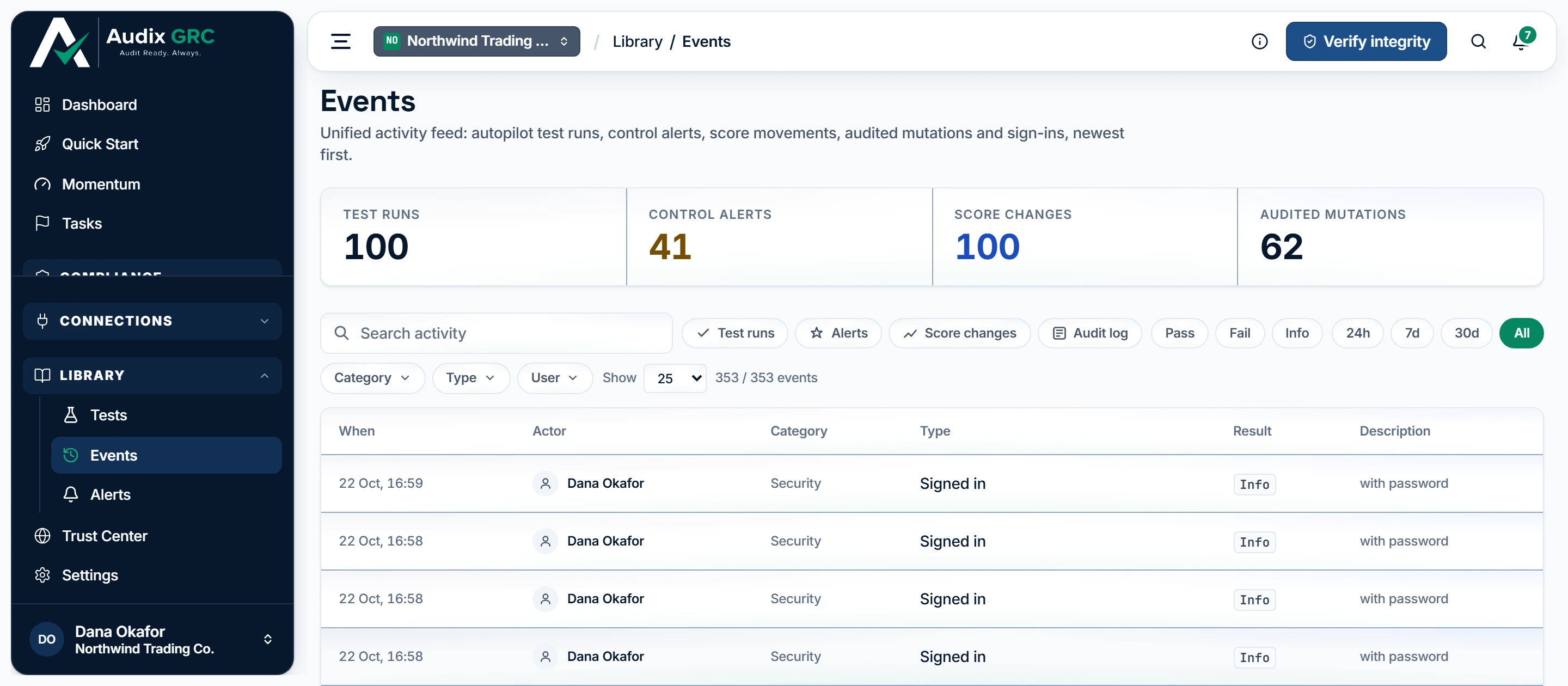
- Four logs, counted. Automated test runs, control-health alerts, score movements and the audited record of every change somebody made. Audited mutations counts changes only: a sign-in is listed in the table below but is not a change, and counting it there would inflate what people did.
- Narrow it to the question you have. Cut the feed by which log a row came from, whether it passed, and how recently it happened; the Category, Type and User dropdowns cut it further without leaving the page. Sign-ins arrive under the Audit log chip with the category Security.
- Who did it. Every row names somebody: a person by name — including the person a sign-in belongs to — Autopilot where the schedule ran the work, or System for the platform's own bookkeeping, so unattended work is never presented as though a colleague did it.
One table merging test runs, control alerts, score changes, audited writes and sign-ins, newest first, with search, source chips, result chips, time chips and Category, Type, User and Trigger dropdowns, and Verify integrity in the header.
In Activity and settings
Tasks on this screen
Find out what happenedLive
One table merging test runs, control alerts, score changes, audited writes and sign-ins, so a change can be reconstructed without opening five screens.
As a member
- Not available. Events is listed for admins only, because the activity log behind it is admin only. Opened by its address, the page shows test runs, control alerts and score changes, and says "Some activity could not be read, so this log is incomplete."
As an admin
- Open Events under Library.
- Four tiles count what loaded: "Test runs", "Control alerts", "Score changes" and "Audited mutations".
- Filter with the search box, the source chips (Test runs, Alerts, Score changes, Audit log), the result chips (
pass,fail,info) and the time chips (24h, 7d, 30d, All). - Narrow further with the Category, Type and User dropdowns. Trigger appears when the loaded test rows carry more than one trigger.
- Each row shows When, Actor, Category, Type, Result and Description.
- A sign-in reads Signed in under Type, with the person under Actor and
securityunder Category. Password changed, Password reset by email code, Sign-in locked after repeated failures and the two-step verification events read the same way, and all of them arrive under the Audit log source chip. - Set the page size with Show (25, 50 or 100). Clear resets every filter at once.
Rules that apply
- Test runs, control alerts, score changes and changes each load their most recent 100 rows, and sign-ins their latest 50. This is a recent window, not a full history, and the tiles count what loaded rather than what exists.
- When one source cannot be read the page says "Some activity could not be read, so this log is incomplete." An unreadable log is never drawn as an empty one.
- Rows with no person behind them are labelled honestly. A scheduled check reads Autopilot, a manual run reads Autopilot, manual run, a score change reads System.
- A row whose name cannot be resolved reads A teammate, never an internal id.
- Changes to who has access read as Invited someone to the organization, Withdrew an invitation, Added a member, Changed a member's role, Removed a member, Added someone to a group and Removed someone from a group, with the address and the role.
- The reads that matter are recorded and labelled: Opened or downloaded evidence, Exported an audit package, Created a download link for an audit bundle, Exported an access review, Exported a policy as a PDF, and downloads of vendor, questionnaire and Trust Center files. Loading a page records nothing.
- Two-step verification events have labels of their own, such as Two-step verification set up, Recovery code used and Two-step codes paused after many wrong codes in a row. A rename reads Changed their display name.
- Changes Audix staff make to your organization are in the same log, for example Changed a feature the organization has, Changed the Trust Center settings, and Trust Center document and practice card changes.
- Monitoring overrides name the check, the resource, the reason and the end date. Zendesk work reads Zendesk ticket created, Told Zendesk a finding was fixed and Changed where Zendesk tickets go.
- An audited write is marked
failwhen the request came back 400 or above, and so are the entries that are never good news, such as an account locked after repeated failures, two-step codes paused, and an AI assistant whose access was revoked for a reused credential. - Sign-ins show in the table but not in the Audited mutations tile, which counts changes only.
- A sign-in row carries no IP address and no browser. Those are kept only on the platform's own security log, which is not part of your organization's record.
Prove the record was not alteredLive
Every write inside the workspace is recorded and chained to the one before it, so an inserted, deleted, reordered or edited row can be spotted.
As a member
- Not available. The activity log and its check are for admins.
As an admin
- Open Events and click the Audit log chip to see only audited writes. Each row names the person, or System where there is none, the kind of thing that changed, the request that changed it, and the response code.
- Click Verify integrity in the header. It re-checks every entry against its hash chain and signatures, and runs only when you press it.
- Read the answer: "Activity log intact. N entries checked: nothing changed, removed or reordered since it was written.", with the time it ran, or "The activity log does not verify." with the reason and the first entry that does not match. If it does not verify, contact support.
Rules that apply
- Every create, update and delete inside the workspace is recorded, and the record is written in the same transaction as the change it describes.
- Only named fields are kept, never the whole request. Renaming the organization records the new name and nothing else.
- A few actions run outside a single workspace and are recorded by name instead, such as leaving, accepting or declining an invitation.
- Each row carries a hash covering its own contents, the row before it, its place in the order and the time it was written, plus a signature made with a key the product never hands out. The signature names the format it covers, so a row cannot be relabelled as an older, weaker one. Two writes at the same moment cannot fork the chain.
- A separate table holds each row's position in the chain, so deleting a row, or deleting a position, is caught rather than closed over quietly.
- Verification names the first row it cannot account for and why: a row was inserted, deleted or reordered, a row was edited, a row is missing its position, a row with a position was deleted, or a signature is invalid.
- Rows written from 22 September 2026 are proved in full. Older ones are proved by recomputing the hash they were given across the field orders the database did not keep, and are reported as unproven, rather than as proved, only when they are too large to search. Nothing was rewritten to make older rows fit the newer format.
- Before that date the check reported tampering on untouched rows in every organization, because the hash covered the order the database happened to hand a field back in. It does not any more.
- Older entries too large to re-check in full are verified by signature and link only, and the answer says how many.
2 questions
Questions about this screen
How do I verify that the Audix activity log has not been tampered with?
As an admin, open Events and click Verify integrity. It re-checks every entry against its hash chain and signatures, and answers "Activity log intact." or "The activity log does not verify." with the first entry that does not match.
Why can't I see Events in the sidebar?
Events is listed for admins only, because the activity log behind it is admin only. Ask an admin, or use Alerts to follow changes in control health.