Screen 08 of 9 · Risk
Risk Analysis
The whole register as a likelihood and impact heatmap, inherent or residual, with treatment progress and saved, approved versions of the assessment.
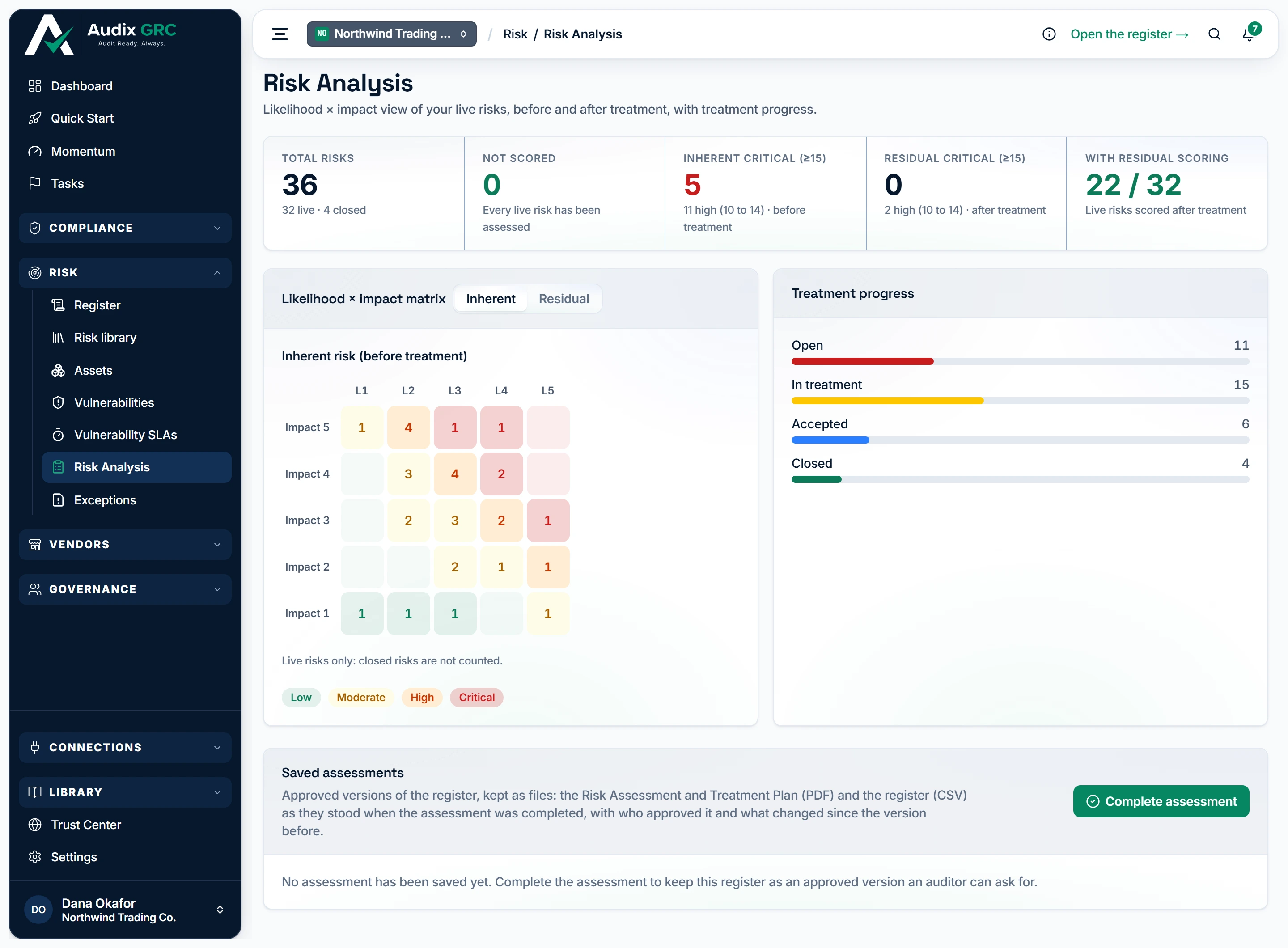
- How much of the register is scored twice. Residual scoring is optional, so the last tile says how much of the register has been re-scored after its controls were taken into account.
- Where the register clusters. Each cell counts the risks at that likelihood and impact, and the Inherent and Residual switch above it shows the same matrix before treatment or after it.
- How far treatment has actually got. One bar per status, so a register full of risks nobody has started on cannot look the same as one being worked.
- Approved versions, kept as files. Complete assessment saves the register as it stands, as a PDF report and a CSV, with who approved it and what changed since the version before. Admins only; none has been saved in this organisation yet.
Tiles for Total risks, Not scored, Inherent critical (≥15), Residual critical (≥15) and With residual scoring, the Likelihood × impact matrix with an Inherent and a Residual switch, a treatment progress bar, and Saved assessments, where an admin saves an approved version of the register as a PDF and a CSV.
In Risk
Tasks on this screen
Read the whole register as a heatmapLive
See where your scored risks cluster on a likelihood by impact grid and how far treatment has got.
As a member
- Open Risk Analysis in the sidebar.
- Read five tiles: Total risks, Not scored, Inherent critical (≥15), Residual critical (≥15), and With residual scoring as a fraction of the total.
- Read the Likelihood × impact matrix: a five by five grid with impact down the side and likelihood across the bottom, each cell coloured by band and counting the risks that sit there. Switch between Inherent and Residual.
- Read Treatment progress: one bar each for Open, In treatment, Accepted and Closed.
- Click Open the register → to go back to the register.
Rules that apply
- The matrix counts live risks only. Closed risks, and risks that are not scored, are not on it. A line under it says how many are not scored, with Assess them in the register.
- With no risks it shows "No risks yet" and a link to add risks to the register.
- Everything on the tiles and the matrix is worked out from the whole register on every visit. Saved assessments are the only thing kept here.
Save an approved version of the risk assessmentLive
Keep the risk assessment as it stood when it was approved, as files an auditor can be handed, with what changed since the version before.
As a member
- Open Risk Analysis and read Saved assessments. Each version reads Version N, who approved it and when, and what changed since the version before.
- Click Treatment plan (PDF) or Register (CSV) on a version to download it.
As an admin
- Click Complete assessment. Add a Note (optional) about what this version covers.
- Click Complete and save version N. The version reads Saving, then Saved, or Failed with the reason.
Rules that apply
- Each version keeps the treatment plan PDF and the register CSV as they were at that moment, with who approved it, when and the note.
- From the second version on, it says what changed, for example "Since version 2: 3 added, 1 deleted, 2 closed, 0 reopened, 4 re-scored."
- Every download of a saved version is recorded, and admins see it on Events as "Downloaded a saved risk assessment".