Screen 04 of 9 · Risk
Risk scoring definitions
What each likelihood and impact level means in your organization, and the risk acceptance policy that decides who approves and how often risks are reviewed.
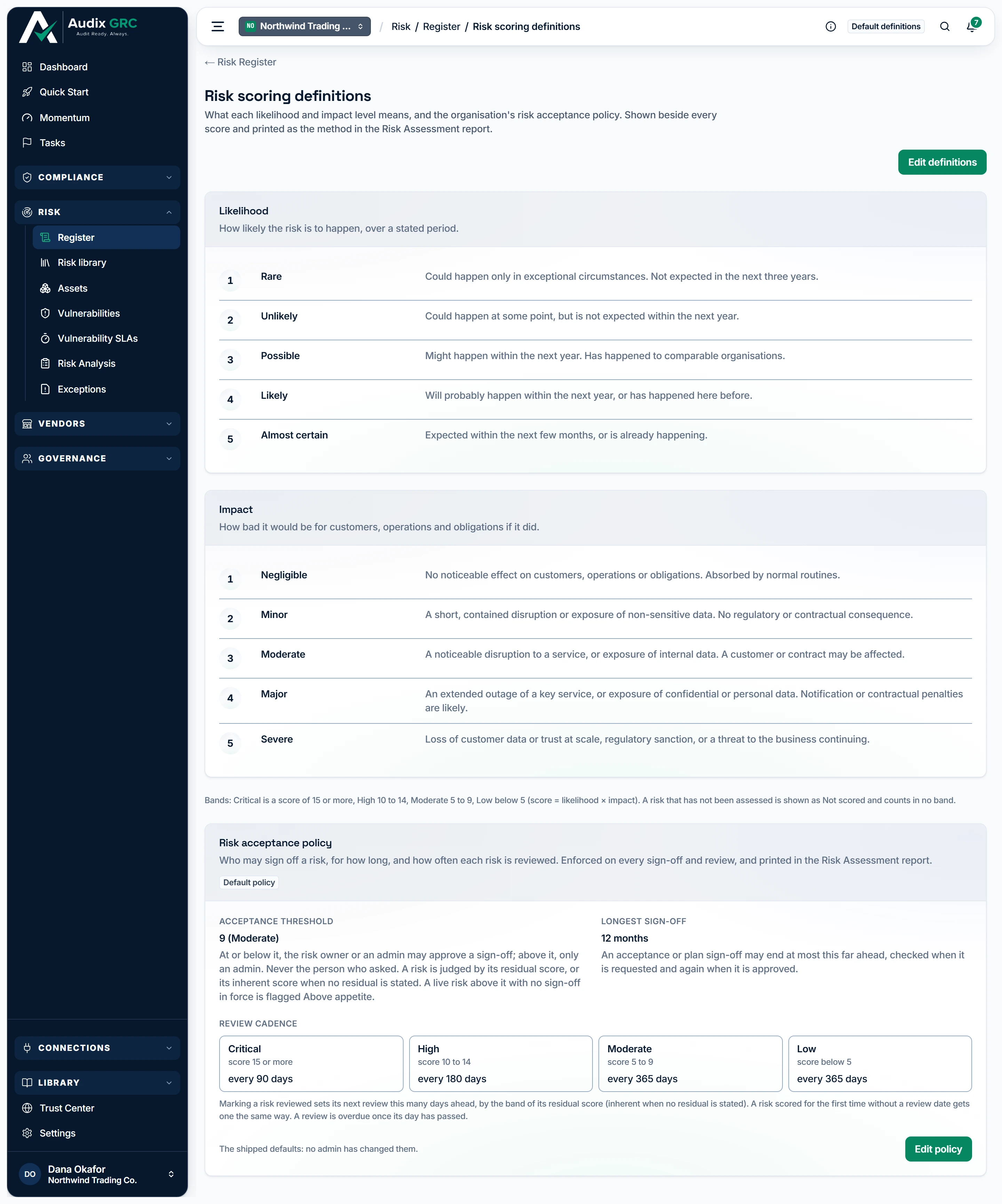
- What each level means, in your words. Five levels for likelihood and five for impact, each with a label and a definition. An admin rewrites them with Edit definitions, and the pill at the top of the page then reads Your definitions instead of Default definitions.
- Who may sign off, and for how long. The acceptance threshold decides when only an admin may approve a sign-off, the longest sign-off caps its end date, and the review cadence sets how often each band is reviewed. Edit policy is for admins.
What likelihood and impact levels 1 to 5 mean, each with a label and a written definition, and a pill saying whether these are Your definitions or the Default definitions. Below it, the Risk acceptance policy: the acceptance threshold, the longest sign-off and how often each band is reviewed.
In Risk
Tasks on this screen
Write down what each score meansLive
Give each likelihood and impact level a label and a written definition, so every score in the register is read the way it was meant.
As a member
- Click Scoring definitions in the Risk Register header. The page is titled Risk scoring definitions.
- Read Likelihood ("How likely the risk is to happen, over a stated period.") and Impact ("How bad it would be for customers, operations and obligations if it did."), each with levels 1 to 5, a label and a definition.
- A pill says whether these are Your definitions or the Default definitions. There is nothing to edit for you.
As an admin
- Click Edit definitions, change any label or definition, and click Save definitions. The page confirms "Saved."
- Fill in the defaults puts the shipped wording back into the form, for you to edit before saving. Cancel throws your changes away.
Rules that apply
- Until you save your own, the defaults apply. Likelihood runs Rare, Unlikely, Possible, Likely and Almost certain. Impact runs Negligible, Minor, Moderate, Major and Severe.
- The definitions show beside every score: in the score pickers, on the risk page, and as the method in the Risk Assessment and Treatment Plan PDF.
- A label is up to 60 characters and a definition up to 1,000.
- Every change is kept in the audit log with the wording before and after it.
Set the risk acceptance policyLive
Decide how much risk the owner of a risk may sign off alone, how long a sign-off may run, and how often each band of risk is reviewed.
As a member
- Open Scoring definitions from the Risk Register header and read Risk acceptance policy: the Acceptance threshold, the Longest sign-off and the Review cadence for each band.
- A pill says whether this is Your policy or the Default policy. There is nothing to edit for you.
As an admin
- Click Edit policy.
- Set Acceptance threshold (score), from 1 to 25: "Above it, only an admin may approve a sign-off."
- Set Longest sign-off (months), from 1 to 36. Sign-offs already approved keep their end dates.
- Under Review every (days), set Critical, High, Moderate and Low, each from 7 to 365 days.
- Click Save policy. Fill in the defaults puts the shipped values back into the form, and Cancel throws your changes away.
Rules that apply
- Until an admin saves a policy, the defaults apply: a threshold of 9, sign-offs of at most 12 months, and reviews every 90 days for critical risks, 180 days for high and 365 days for moderate and low.
- At or below the threshold, the risk's owner or an admin can approve a sign-off. Above it, only an admin can.
- A risk scored above the threshold with no sign-off is flagged Above appetite, no sign-off, on the risk and in the register's filters.
- The cadence decides a risk's next review each time it is reviewed, from its residual score, or its inherent score when it has no residual one. A score raised into a band reviewed more often pulls the next review in.
1 question
Questions about this screen
How do I change what the likelihood and impact levels mean?
Open Scoring definitions from the Risk Register header. Admins click Edit definitions, change the label and written definition of any level from 1 to 5, and click Save definitions. The wording shows beside every score and is printed as the method in the Risk Assessment and Treatment Plan PDF.