Screen 03 of 5 · Controls and Frameworks
Frameworks
The frameworks you are working towards and the ones you could adopt, each with its readiness, the requirements met and a jurisdiction filter.
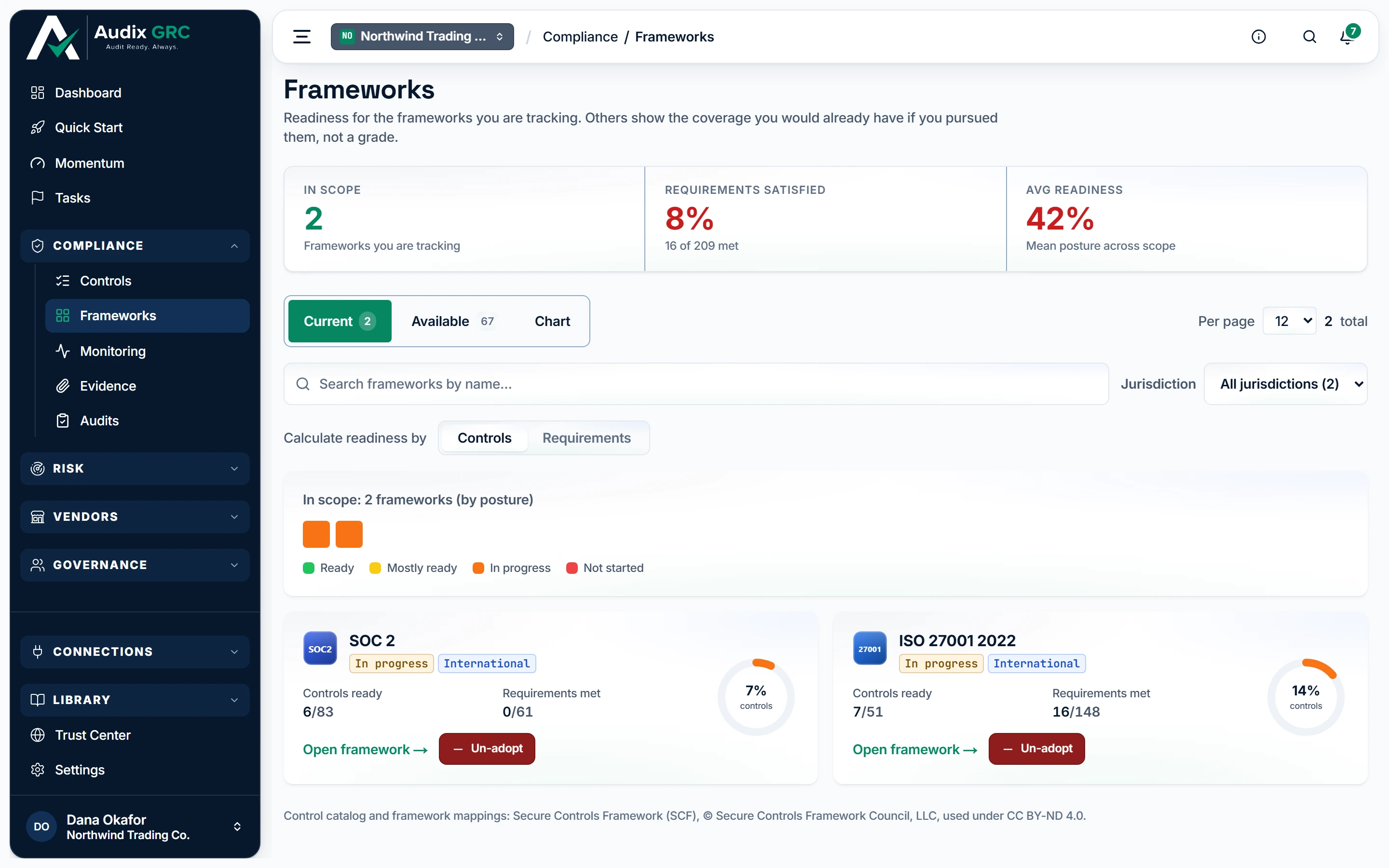
- One gauge per framework. Each is worked out from the same control work, so a second framework is never a second pass at the same evidence.
Why the same control counts more than once
Wider than this screen: swipe sideways across the flow to follow it.
Tiles for In scope, Requirements satisfied and Avg readiness, tabs for Current, Available and Chart, a search box and a Jurisdiction filter, and a readiness gauge on every card. Adopt and Un-adopt show for admins only.
Audix GRC Frameworks: many compliance programs, one platform
In Controls and Frameworks
Tasks on this screen
Choose the frameworks you are working towardsLive
Adopting a framework records that you are pursuing it and brings every control it requires into your scope in one action.
As a member
- Open Frameworks. The tiles read In scope, Requirements satisfied and Avg readiness. The Current tab lists what is in scope. The Available tab lists everything else, with the coverage your existing controls would already give it.
- Switch Calculate readiness by between Controls and Requirements to change what the gauges count.
- Search by name, or filter by readiness, mapping and jurisdiction.
- Click Open framework to read it requirement by requirement.
- You cannot adopt or un-adopt. The buttons do not appear for you.
As an admin
- On the Available tab, click Adopt on a card.
- Every control that framework maps to is brought into scope in state Planned. Controls you already had keep their owner, state and score.
- You get "Adopted <name>. It now appears under Current." When policy templates are written for that framework and your library lacks them, the toast adds a link: "N policy templates are recommended".
- To drop one, click Un-adopt on the Current tab and confirm. The dialog says the framework stops being scored and leaves the dashboard, and that your controls stay adopted.
- Put it back at any time from Available.
Rules that apply
- Un-adopting removes only controls nobody touched: still Planned, no owner, no notes. Anything you worked on stays in scope and stays on the Controls list.
- A large framework brings in hundreds of controls at once. They all start at Planned and count against your readiness from that moment.
- If the page cannot read your current scope, both buttons refuse: saving would drop the frameworks it could not see.
- Adopting or un-adopting queues a rescore, so the dashboard moves within a few seconds.
- Adopting never adds a policy. Recommended templates are added only when someone chooses them.
Find the frameworks that apply where you operateLive
Narrow the catalogue to the frameworks a country, a US state or a bloc such as the EU makes binding, with the international standards beside them when you want them.
As a member
- On Frameworks, open the Jurisdiction select beside the search box. It lists All jurisdictions, International, then each region with its blocs and countries, US states under the United States, and Not yet classified. Each choice shows how many frameworks it finds on the current tab.
- Pick a place. To keep ISO, SOC 2, NIST CSF and the other worldwide standards in the list, tick Include international standards.
- Each card carries a pill naming where the framework applies, for example European Union or International.
- For some countries a note says what the catalogue does not hold yet.
Rules that apply
- A framework belongs to a place when a law or a government programme of that place makes it binding. A voluntary standard, or one binding only through a worldwide scheme, such as ISO, NIST CSF, SOC 2 and PCI DSS, is International.
- A country also finds the frameworks of every bloc it belongs to, so Germany finds the EU's. A US state narrows the state frameworks only, and national ones stay.
- A framework nobody has classified reads Not yet classified. It is never guessed to be International.
- The choice holds when you switch between Current and Available. The search box and the filter work together.
Show the policies, requirements and risks behind a controlLive
Three tabs answer what documents the control, what it satisfies, and what it protects against.
As a member
- Policies lists the governing documents with version, status, renewal date and owner, under a Policy in place or No published policy pill. Each row opens the policy.
- Frameworks lists one row per requirement the control satisfies, with the framework, the requirement code and this control's readiness repeated.
- Risks lists the risks the control mitigates with reference, inherent score and status. A risk nobody has scored reads Not scored. The empty state links to the risk register.
As an admin
- Same as a member, plus Map policy on the Policies tab: pick a policy and click Map.
Rules that apply
- Every requirement row reads "Wording not published in the crosswalk". The crosswalk carries codes and mappings, not the standards body's text.
- The Frameworks tab does not exist on a custom control, because a custom control has no crosswalk.
- Risks are attached from the risk's own page, not from here.
- The requirement fan-out is pinned to the catalogue version the control came from.
3 questions
Questions about this screen
How do I adopt a framework in Audix?
Open Frameworks, go to the Available tab and, as an admin, click Adopt on the framework's card. Every control it maps to comes into scope as Planned, and controls you already had keep their owner, state and score.
What happens to my controls when I un-adopt a framework?
Only controls nobody touched are removed: still Planned, with no owner and no notes. Anything you worked on stays in scope, while the framework stops being scored and leaves the dashboard. You can adopt it again at any time from Available.
How do I find the frameworks that apply in my country?
On Frameworks, pick your country, US state, bloc or region in the Jurisdiction select. Tick Include international standards to keep worldwide standards such as ISO, NIST CSF, SOC 2 and PCI DSS in the list. A country also finds the frameworks of every bloc it belongs to, so Germany finds the EU's.