Screen 02 of 9 · Risk
Risk library
219 specific risks in 13 categories, each with suggested SCF controls, to add to your risk register unscored and ready to assess.
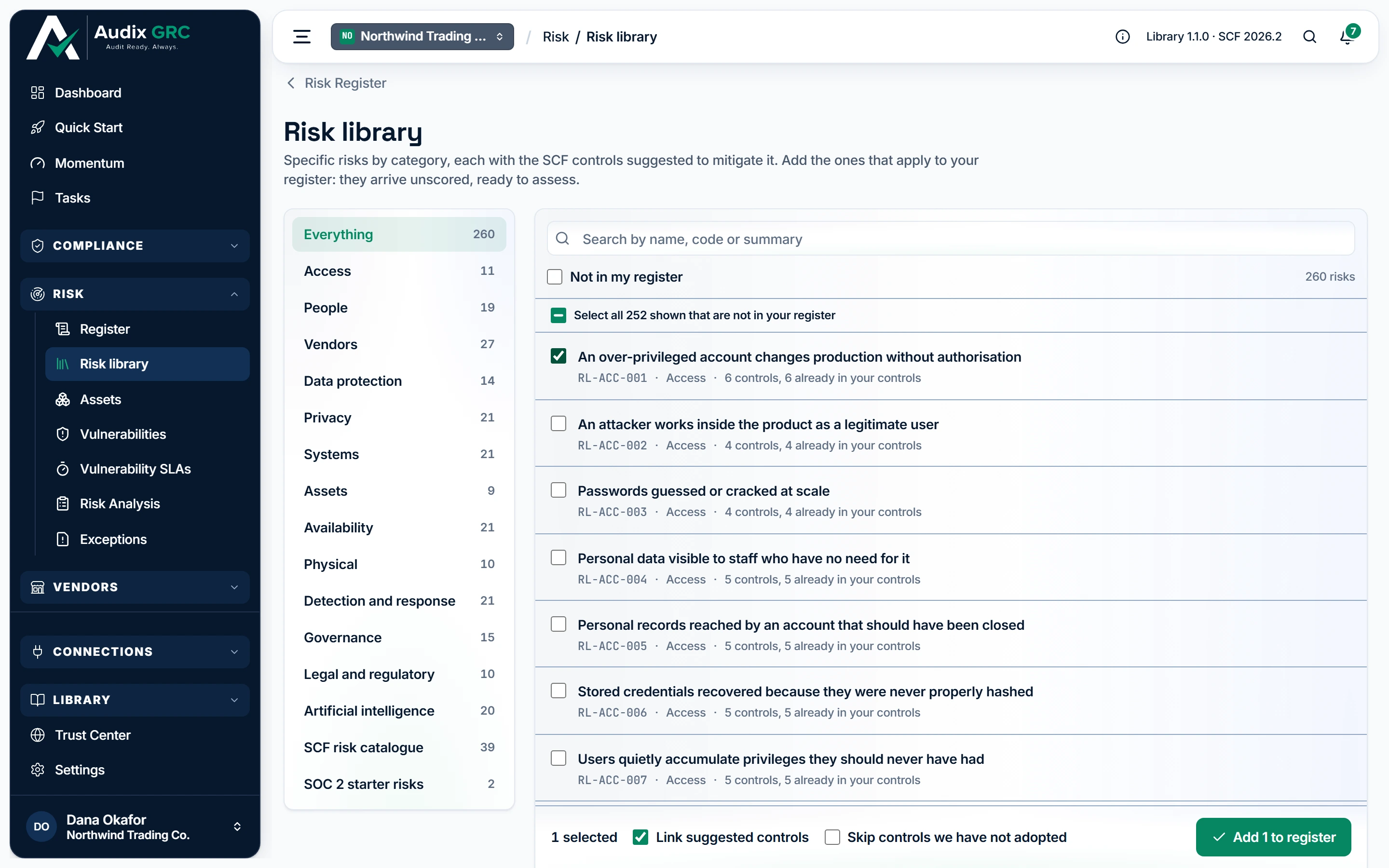
- Thirteen categories, and two more sources. The library's own risks sit in 13 categories, each with its count; the SCF risk catalogue and the SOC 2 starter risks are listed below them.
- Search, or hide what you already have. Search by name, code or summary. Not in my register hides every entry already in your register, so the list gets shorter as the register grows.
- One risk and the controls it suggests. Each row gives the code, the category and how many SCF controls the entry suggests, with how many of those your organisation already has. Click the name to read it in full.
- Tick, then add them in one go. Every entry ticked is added at once, unscored and untreated, linked to the controls it suggests unless Link suggested controls is unticked. Admins only.
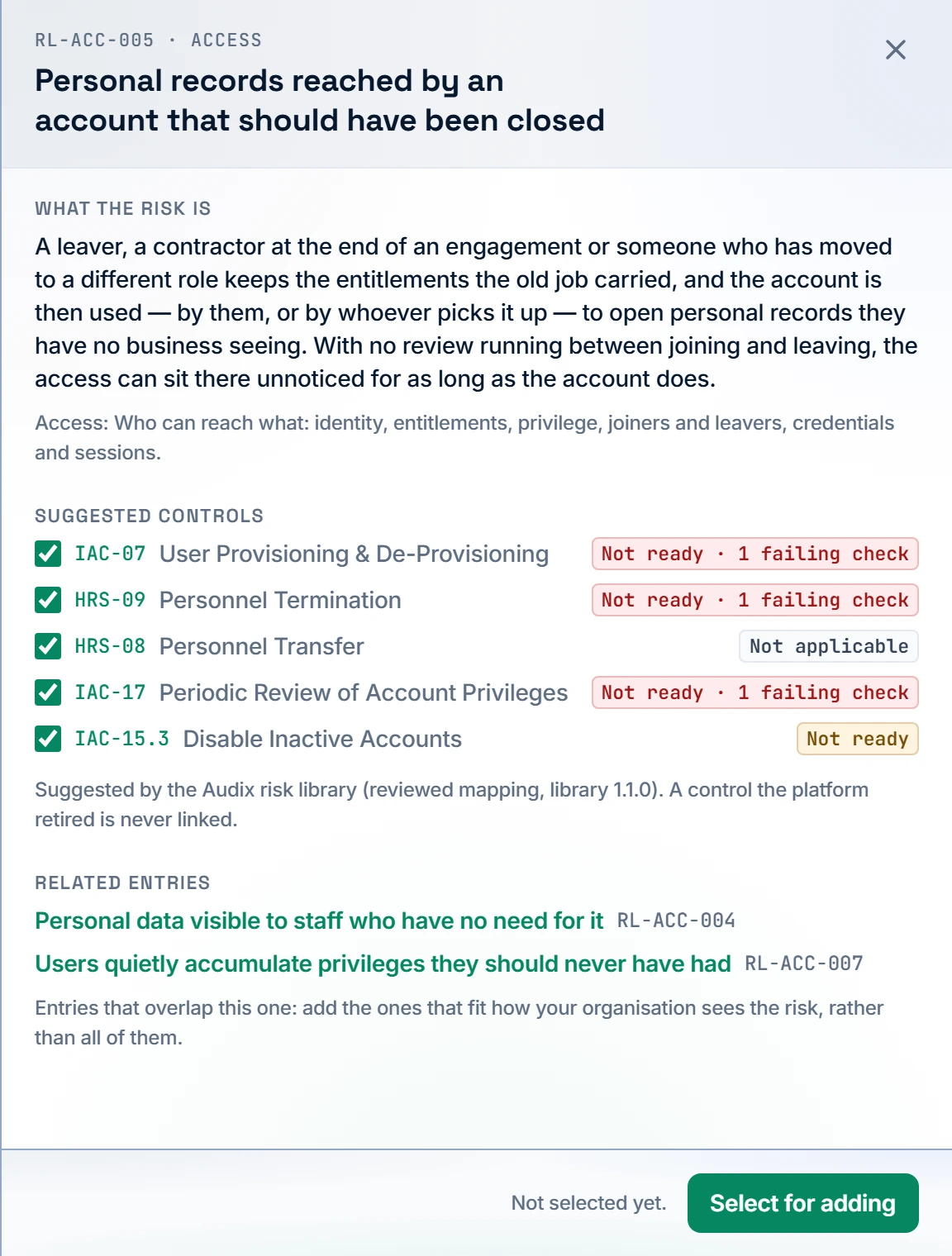
- What would treat it, and how ready you are. Each suggested SCF control carries your organisation's readiness for it today. Untick one to leave it out when the risk is added; the risk's page offers it again later as a one-click Link.
- Entries that overlap. Open one in the same panel to compare, and add the ones that match how your organisation sees the risk rather than all of them.
- Select it for adding. An admin ticks the entry from here or from the list; it is added with the others from the bar at the foot of the library.
A rail of categories with their counts, from Everything through the 13 library categories to the SCF risk catalogue and the SOC 2 starter risks, a search, a Not in my register filter, and one row per risk with its controls. Clicking a risk opens What the risk is, its Suggested controls with how ready each one is in your organisation, and its Related entries. Admins tick risks and click Add N to register.
In Risk
The task on this screen
Start the register from the risk libraryLive
Fill the register with specific risks written for you, each arriving with the SCF controls that mitigate it, instead of typing every one.
As a member
- Open Risk library under Risk, or click Browse the risk library on the register.
- Pick a category in the rail. Each one shows how many risks it holds and, under the search, what it covers. Everything shows them all, and the SCF risk catalogue and the SOC 2 starter risks sit below the 13 categories.
- Search by name, code or summary, and tick Not in my register to hide what you already have.
- Each row reads its title, its category and its controls, for example "5 controls, 3 already in your controls". A risk you already added reads In your register.
- Click a risk to read What the risk is, the Suggested controls, each with a pill saying how ready it is in your organisation, and the Related entries that overlap it.
As an admin
- On Risk Register, click Start from the risk library, or open Risk library from the sidebar.
- Tick the risks that apply, one by one, or tick Select all N shown that are not in your register for the category, search or filter on screen.
- Keep Link suggested controls ticked to link each risk's suggested controls as it is added. Tick Skip controls we have not adopted to link only controls already in your scope.
- To leave one suggested control out of a risk, open the risk and untick that control.
- Click Add N to register. The toast reads, for example, "Added 12 risks to the register, unscored, ready to assess."
Rules that apply
- The library holds 219 risks in 13 categories: Access, People, Vendors, Data protection, Privacy, Systems, Assets, Availability, Physical, Detection and response, Governance, Legal and regulatory, and Artificial intelligence. Each suggests 2 to 6 SCF controls.
- An added risk arrives unscored and untreated, ready to assess. Its page carries a From the risk library chip with its code, such as
RL-ACC-001, and its History starts with "Added from the risk library", naming the library entry and version and the controls it linked. - A risk already in your register cannot be added twice, not even by a double click. At most 300 risks are added at a time.
- A suggested control you left out, or unlinked later, stays on the risk's page as a suggestion with a one-click Link. Nothing links it again on its own, and a later version of the library never changes a risk already in your register.
- SCF risks come without suggested controls, because SCF relates each one to far more controls than anyone could link. Link controls on the risk's page once it is in your register. The two SOC 2 starter risks, on fraud and on significant change, link their controls like library risks.
- A control retired from the catalogue is never linked.
- The register CSV has a Catalogue entry column naming where each added risk came from.
- Only an admin adds risks: "Only an admin can add risks from the library to the register. You can browse every entry and its controls."
2 questions
Questions about this screen
What is the Audix risk library?
Risk library under Risk holds 219 specific risks, written by Audix, in 13 categories such as Access, Vendors, Privacy and Artificial intelligence, beside the SCF risk catalogue and two SOC 2 starter risks. Each library risk suggests 2 to 6 SCF controls. Admins tick the ones that apply and click Add N to register, and each arrives unscored, ready to assess.
Does a risk added from the risk library come with controls?
Yes, when Link suggested controls is ticked, which it is by default. Each risk links the SCF controls it suggests, or only the ones you have adopted when you tick Skip controls we have not adopted. A suggestion you leave out stays on the risk's page with a one-click Link, and nothing links it again on its own.